

Steve Duck Skin v1.0.0
Overview
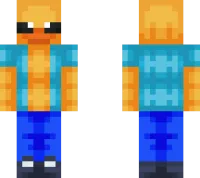
Steve Duck Skin mine-craft 24-02-2026, 10:34 565 Skins Steve Duck Skin is pure fun. It takes the familiar Steve vibe and blends it with a duck look, which instantly turns your character into something weird in the best way. That combo works great because itâs recognizable and ridiculous at the same timeâyou look like Steve, but also definitely not Steve.In normal survival, Steve Duck Skin makes everyday gameplay feel more entertaining for no reason. Mining, building, fighting mobs, even getting chased by creepers just feels funnier when your character looks like a ducked-out version of the default guy. Itâs the kind of skin that gets reactions from friends fast, especially when everyone else is wearing serious skins and you show up looking like a walking joke.Steve Duck Skin is also perfect for minigames and multiplayer servers because itâs easy to spot and easy to remember. If you like meme skins, remix skins, or anything that makes your Minecraft Bedrock character feel less serious and more chaotic, Steve Duck Skin is a great one to keep in your skin rotation.How to Install Skins in Minecraft Bedrock- Download a .png skin (64Ã64 or 128Ã128).- Open Minecraft Bedrock.- Go to Profile (hanger icon) â Edit Character.- Tap Owned â Import â Choose New Skin.- Select your .png file.- Pick a model: Classic (Steve) or Slim (Alex).- Confirm to equip and play.steve-duck-23886707-1_png.zip [1.44 Kb] (downloads: 23)
💬 Comments (0)
Login to leave a comment.
No comments yet. Be the first!