

Glow Squid Skin v1.0.0
Overview
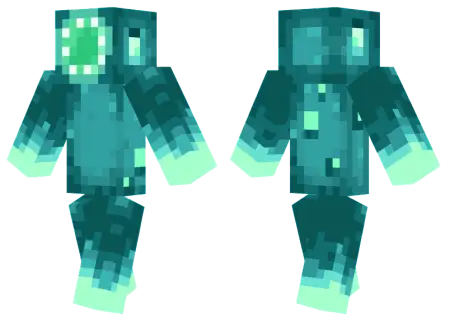
Glow Squid Skin mine-craft 4-07-2026, 07:50 273 Skins Light up the darkest underwater caves with the Glow Squid Skin, a custom design that brings the most vibrant mob from the Caves & Cliffs update straight to your wardrobe. It is the perfect download to flash some neon aquatic vibes on your realm.Letâs be real, the Glow Squid was arguably the most controversial mob vote winner in Minecraft history. Regardless of where you stand on the actual mob, rocking its aesthetic as a custom Minecraft skin is an absolute flex. If your current multiplayer outfit is just another generic teen or a default Steve, you are seriously missing out on some major drip. While it might not literally emit dynamic light without specific shaders, the bright teal and starry texture work makes it pop aggressively against dark backgrounds. It is hilarious, super unique, and definitely stands out in a crowded server lobby. Finding high-quality MCPE skins that successfully turn non-humanoid mobs into wearable outfits is actually pretty tough, but this one completely nails the assignment. Grab this Minecraft skin download, hit your dressing room, and go claim your spot at the bottom of the sea.Floating through a flooded ravine in pitch black usually means you are seconds away from a trident to the face, but rocking the Glow Squid skin instantly makes you the most mesmerizing deep-sea anomaly in the chunk. Taking the most heavily debated mob vote winner and turning its bioluminescent aesthetic into your personal cosmetic loadout is an absolute power move.For years, the community roasted this glowing cephalopod for just aimlessly drifting around underground aquifers dropping ink sacs. However, translating that aquatic mob aesthetic into a wearable Minecraft Bedrock skin completely redeems the design. The pixel artists nailed the translation, layering deep abyssal navy blues against hyper-vibrant cyan and aqua accents. When you are mapping out a massive underwater dome or raiding an Ocean Monument, you actually look like you belong in the environment. The high-contrast color palette mimics actual deep-ocean luminescence, meaning your character model pops wildly when exploring dimly lit spaces like Lush Caves or even sneaking around the edges of the Deep Dark.Taking this custom cosmetic into a crowded Bedrock multiplayer server changes your entire presence. Most players try to blend in with dark, muted tones to avoid getting targeted during PvP skirmishes or chaotic mini-games. By throwing on a neon-bright squid suit, you are doing the exact opposite. You become a walking beacon, which makes styling on your friends in a sweaty Skywars match infinitely more disrespectful. Beating a fully geared opponent while dressed as a passive aquatic creature is the ultimate server flex. You are practically daring the entire lobby to challenge your raw mechanical skill.How to Install Skins in Minecraft Bedrock- Download a .png skin (64Ã64 or 128Ã128).- Open Minecraft Bedrock.- Go to Profile (hanger icon) â Edit Character.- Tap Owned â Import â Choose New Skin.- Select your .png file.- Pick a model: Classic (Steve) or Slim (Alex).- Confirm to equip and play.glow-squid-skin_png.zip [1.43 Kb] (downloads: 7)
💬 Comments (0)
Login to leave a comment.
No comments yet. Be the first!