

Spider-Fans Club Skinpack v1.0.0
Overview
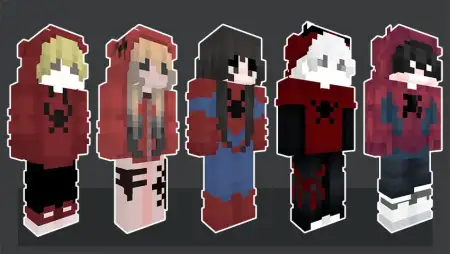
Spider-Fans Club Skinpack mine-craft 9-02-2026, 17:03 803 Skins Spider-Fans Club Skinpack is basically a âwear your fandom in-gameâ pack that keeps things stylish instead of loud. Itâs for Spider-Man fans, and it comes with five skins split across male and female options, all built around muted red and blue tones. That color choice matters because it keeps the look recognizable while still fitting into normal survival worlds. You can be mining, building, or running around a server and still look themed without sticking out like a glowing sign.In Minecraft Bedrock gameplay, these skins are perfect for co-op sessions and Realms where people like to match vibes. If you and your friends are doing a city build, parkour map, or just messing around in survival, a Spider-fan style skin instantly gives your character a âheroâ identity. Practical tip: if youâre playing multiplayer, use one of the five skins as your main and let your friends pick the others so your group looks coordinated. Itâs a simple way to feel like a squad without needing any extra mods or roleplay rules.Muted red and blue also looks good in motion. When youâre sprinting through forests, fighting in caves, or doing PvP, softer tones keep the skin readable without turning into a blurry mess. It also helps for screenshots, because the colors wonât clash with every background. If you like building, itâs easy to match your base palette tooâreds for rooftops, blues for accentsâso your character and your builds can feel like theyâre part of the same style.Spider-Fans Club Skinpack is at its best when you treat it like a fun identity pack. Youâre not just wearing random clothesâyouâre showing youâre a Spider-Man fan while still keeping the look clean and playable. Five options is also a sweet spot: enough variety for different moods and friends, but not so many that youâll never remember which one you liked.How to Install Skins in Minecraft Bedrock- Download a .png skin (64Ã64 or 128Ã128).- Open Minecraft Bedrock.- Go to Profile (hanger icon) â Edit Character.- Tap Owned â Import â Choose New Skin.- Select your .png file.- Pick a model: Classic (Steve) or Slim (Alex).- Confirm to equip and play.spider-man.mcpack [20.78 Kb] (downloads: 125)
💬 Comments (0)
Login to leave a comment.
No comments yet. Be the first!