

Creeper Girl Skin Pack v1.0.0


Overview
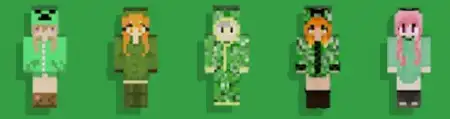
Creeper Girl Skin Pack mine-craft 12-09-2025, 22:01 1 366 Skins Boom, but make it fashion. The Creeper Girl Skin Pack takes that iconic green palette and turns it into a full wardrobeâsleek hoodies, streetwear cuts, and hair colors that sit right on Minecraft Bedrockâs blocky canvas. You load in and the vibe is instant: classic creeper pixels woven into jackets and trim, neon accents where it counts, and silhouettes that still read clearly in third-person and first-person hands.Iâve been running these on SMP and they just work everywhere. In survival, the greens pair perfectly with bamboo, copper, and moss buildsâyour character becomes part of the scene instead of clashing with it. Drop into a market plaza, hit F5, and itâs instant thumbnail material; shader sunsets bounce off the pastel highlights without blowing out the look. Armor doesnât ruin the fit eitherâiron and diamond frames leave just enough creeper pattern peeking through that you still feel on-brand mid-raid. For roleplay nights, itâs easy to theme: hang a creeper banner by your stall, dye beds and candles to match, and your setup reads âcuratedâ without a texture pack.Movement reads clean in parkour and PvP, too. The designs keep strong outlines so teammates spot you in a crowd, and the color pops against stone, wood, and nether blocks for crisp callouts. Itâs strictly cosmeticâno hitbox weirdness, no performance taxâso achievements and gameplay stay stock. If you love classic Minecraft flavor but want a little modern drip, Creeper Girl Skin Pack nails that sweet, playful tone and makes every screenshot look like you planned it.How to Install Skins in Minecraft Bedrock- Download a .png skin (64Ã64 or 128Ã128).- Open Minecraft Bedrock.- Go to Profile (hanger icon) â Edit Character.- Tap Owned â Import â Choose New Skin.- Select your .png file.- Pick a model: Classic (Steve) or Slim (Alex).- Confirm to equip and play.creeper-girl-update-1.mcpack [15.54 Kb] (downloads: 70)
💬 Comments (0)
Login to leave a comment.
No comments yet. Be the first!