

Colorful Girls Skin Pack v1.0.0

Overview
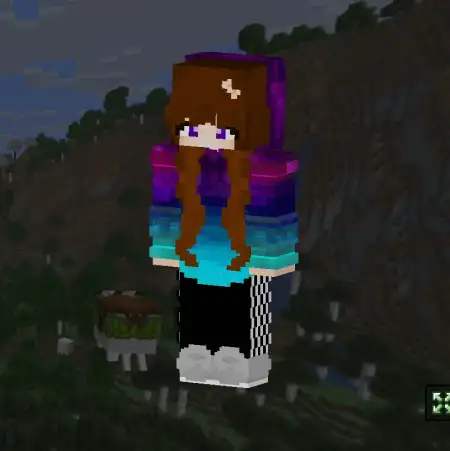
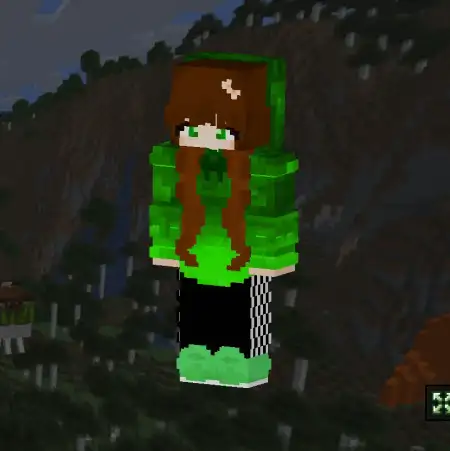
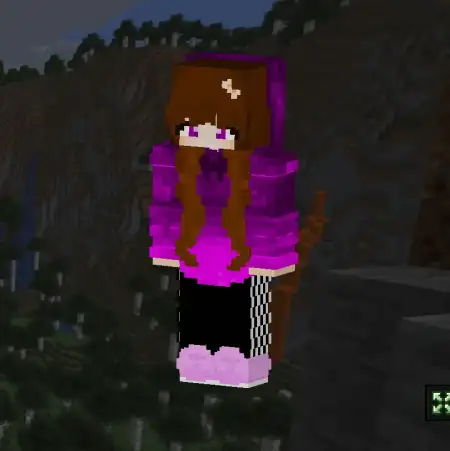
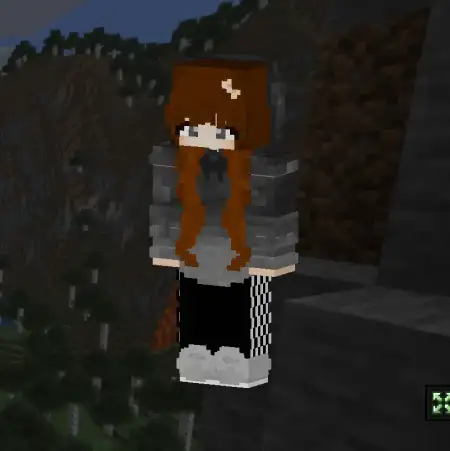
Colorful Girls Skin Pack mine-craft 25-09-2025, 14:40 859 Skins Colorful Girls Skin Pack â a simple way to make your Minecraft Bedrock look pop the second you load in. Iâve been swapping through these skins across a couple worlds, and the vibe is exactly what it says on the tin: lots of color, lots of energy, and a clean read from a distance so teammates can spot you fast. Whether you lean soft pastels or bold brights, thereâs a look here that fits the mood of your session without clashing with vanilla builds.In survival, I like using the Colorful Girls Skin Pack to mark roles without saying a word. Throw on a warmer palette when Iâm base-building, switch to something louder for boss nights, and the screenshots come out great either way. On servers and realms, the colors help the whole squad feel coordinatedâpick a different shade each and youâve got instant team identity for Bedwars, SkyWars, or quick arena lobbies. The designs stay readable under armor, so you still recognize whoâs who when fights get messy and shields start flying.Itâs also perfect for city and school maps where style sells the scene. Walk the plaza with friends, stage quick photo ops on rooftops, then jump into minigames without losing that clean color story. Swapping is easy in the Bedrock dressing room: pick a favorite before a run, rotate mid-session if you want a new feel, and keep playing. If your characterâs been stuck on the same old fit, the Colorful Girls Skin Pack is a fast refresh that adds personality without overthinking itâbright colors, fun vibes, and a look that lands anywhere you take it in Minecraft Bedrock.How to Install Skins in Minecraft Bedrock- Download a .png skin (64Ã64 or 128Ã128).- Open Minecraft Bedrock.- Go to Profile (hanger icon) â Edit Character.- Tap Owned â Import â Choose New Skin.- Select your .png file.- Pick a model: Classic (Steve) or Slim (Alex).- Confirm to equip and play.colorfulgirls.mcpack [113.78 Kb] (downloads: 44)
💬 Comments (0)
Login to leave a comment.
No comments yet. Be the first!