

Blue Paradise Skin v1.0.0
Overview
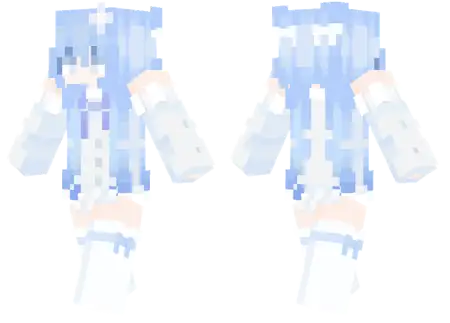
Blue Paradise Skin mine-craft 3-07-2026, 13:25 382 Skins Give your character a total aesthetic glow-up with the Blue Paradise Skin, featuring vibrant long blue hair and a matching baby blue outfit. It's the perfect choice for anyone wanting a clean, stylish look that stands out in any multiplayer lobby.Finding custom Minecraft skins that don't look completely messy or generic can be an absolute headache. Most of the stuff trending in the marketplace right now is either loaded with blinding neon pixels or just looks like a clone of everything else. This design takes a totally different route, leaning heavily into a soft, pastel streetwear vibe that looks incredibly clean. The monochrome baby blue outfit pairs perfectly with the long hair, giving off major pro-builder or chill survival vibes.We have all seen the endless wave of edgy, dark-robed assassins and oversized anime avatars clogging up the servers. Choosing to bypass all that noise and equip a scenic landscape instead is a top-tier aesthetic choice. This Minecraft Bedrock skin is an absolute masterpiece of pixel art, mapping a vibrant blue sky and fluffy clouds right across the headpiece. Your torso is literally a turquoise ocean crashing onto a sandy shoreline, complete with a highly detailed green palm tree stretching across the front. Meanwhile, your legs anchor the whole fit with a clean, textured sand look. It is a massive departure from traditional character outfits, functioning more like a wearable canvas than a standard piece of clothing.Dropping into a hardcore survival realm or a fast-paced PvP minigame looking like a chill summer postcard instantly messes with the opposition. Imagine getting totally outplayed and knocked into the void by a guy whose chest is a literal beach. It brings a lighthearted, trolling energy to the game without resorting to obnoxious, bulky geometry that ruins your hitboxes. The colors are incredibly saturated, making that bright blue and green combo pop beautifully whether you are exploring a dark cavern or building a massive base in the Nether.If you run a dedicated roleplay server or just love hanging out in custom city maps during the summer months, this specific cosmetic is a mandatory addition to your wardrobe. It perfectly fits the chill, relaxed energy of beachside builds and coastal survival bases. On the technical side, because it uses standard resolution mapping, you do not have to stress about client lag or weird rendering glitches on mobile and console. The texture wraps seamlessly around the slim or classic player models, keeping your first-person view completely unobstructed for those critical bow shots.Itâs especially great if you spend a lot of time on servers like The Hive or running around a shared family realm. The cool tones really pop against standard green landscapes, making your character look instantly recognizable in screenshots or gameplay clips. Plus, it works flawlessly across all mobile and console platforms. If you're bored of looking like every other player in the lobby, this MCPE skin download is the easiest fix. Grab the file, toss it into your Minecraft Bedrock skins menu, and show off a fresh new style during your next session.How to Install Skins in Minecraft Bedrock- Download a .png skin (64Ã64 or 128Ã128).- Open Minecraft Bedrock.- Go to Profile (hanger icon) â Edit Character.- Tap Owned â Import â Choose New Skin.- Select your .png file.- Pick a model: Classic (Steve) or Slim (Alex).- Confirm to equip and play.blue-paradise-skin_png.zip [2.69 Kb] (downloads: 30)
💬 Comments (0)
Login to leave a comment.
No comments yet. Be the first!