

3D Creeper Skin v1.0.0
Overview
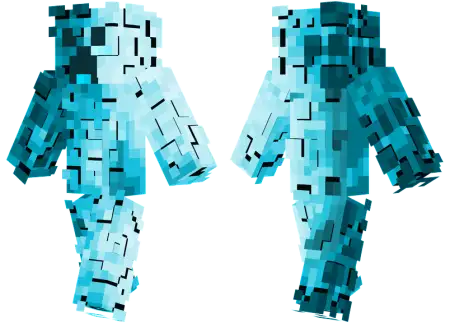
3D Creeper Skin mine-craft 4-07-2026, 07:44 329 Skins Stand out from the crowd with the 3D Creeper Skin, swapping the classic green camouflage for an icy blue aesthetic with insane visual depth. It is a completely fresh take on Minecraft's most notorious mob.We all know the standard creeper look by heart at this point. It is iconic, but let's be real, wearing the basic vanilla mob suit on a multiplayer server is getting a little old. This custom Minecraft skin takes that familiar face and hits it with a heavy visual glitch, using clever shading to create a fake 3D pixelated effect. The icy blue color palette totally changes the vibe, making your character look like a frozen anomaly that just spawned straight into the Overworld.Walking into a crowded minigame hub wearing a fully volumetric suit instantly separates you from the army of basic hoodies and low-res anime imports. There is genuine intimidation factor woven into the design. Imagine holding the line in a tense Bedwars match, and instead of a flat texture pushing your bridge, a physically layered, bulky Creeper charges out of the fog. It brings a heavy, boss-fight energy to standard PvP exchanges, forcing whoever is in your crosshairs to respect the sheer physical presence of your avatar.You might expect all these extra polygons to tank your client performance, but the geometry is rigorously optimized for the native engine. Because it leverages built-in custom skin support, you do not have to fiddle with unstable third-party resource packs or worry about client-side desync ruining your session. Your hitboxes remain perfectly synchronized with standard vanilla parameters, meaning you get all the visual intimidation of an oversized, 3D monster without absorbing cheap arrow shots that should have mathematically missed. Whether you are running a high-end PC rig or tapping away on a mobile screen, the geometric rendering stays razor-sharp and entirely stutter-free.If you play a lot of fast-paced minigames or just like messing around in survival realms, having an outfit that naturally breaks the mold is always a flex. The shading trickery here makes the textures pop in a way that most standard Minecraft Bedrock skins just cannot pull off. Plus, running around a snowy tundra biome looking like an aggressive ice elemental is just a really fun way to mess with your friends during a late-night session.Finding top-tier MCPE skin downloads with this much attention to detail is actually pretty rare. If you are tired of the same old green palette and want to upgrade your wardrobe with something completely different, you definitely need to grab this file. Toss it into your character creator and bring the freeze to your next server.How to Install Skins in Minecraft Bedrock- Download a .png skin (64Ã64 or 128Ã128).- Open Minecraft Bedrock.- Go to Profile (hanger icon) â Edit Character.- Tap Owned â Import â Choose New Skin.- Select your .png file.- Pick a model: Classic (Steve) or Slim (Alex).- Confirm to equip and play.3d-creeper-skin_png.zip [2.79 Kb] (downloads: 30)
💬 Comments (0)
Login to leave a comment.
No comments yet. Be the first!