

Skeleton Skin Pack v1.0.0
Overview
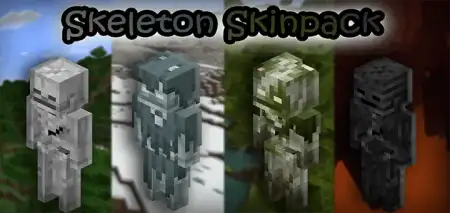
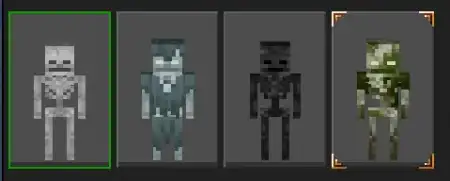
Skeleton Skin Pack mine-craft 20-09-2025, 14:36 1 215 Skins Skeleton Skin Pack is your go-to undead wardrobe for Minecraft Bedrockâa clean, faithful set of skeleton skins that actually look like the mobs youâve been dodging since forever. Every skin sticks to the original mob textures, so the look lands instantly: crisp bones, the Strayâs proper winter getup, and the Bogged with its two-layer head detail intact. All of them use thin arms and legs, which keeps the silhouette sharp and readable when youâre sprinting, strafing, or lining up shots.Iâve been running this on minigame nights and it just works. In PvP, the thin-arm geometry reads better in motion, so teammates can ID you at a glance even with shaders on. For roleplay, itâs free flavor: Strays patrolling a snowy wall, Bogged creeping through swamps, classic skeletons guarding catacombs under a town. Because the pack mirrors vanilla art, it plays nice with texture packsâno plasticky mismatch when you flip your favorite visuals back on.Itâs also perfect for âInfectedâ lobbies and Halloween servers. Put Strays on defense with bows, Bogged as ambushers in mangrove, and standard skellies as roamers; screenshots look legit and your stream chat will clock the theme instantly. If youâre building an adventure map, these skins double as uniform costumes for staff or testers without breaking immersion.No fluff, no gimmicksâjust a tight bundle of undead looks that feel native to Bedrock and elevate whatever youâre doing, from sweaty PvP queues to chill survival nights. If youâve ever wished your skin matched the arrows you spam, Skeleton Skin Pack nails the vibe and keeps your lobby stylishly skeletal.How to Install Skins in Minecraft Bedrock- Download a .png skin (64Ã64 or 128Ã128).- Open Minecraft Bedrock.- Go to Profile (hanger icon) â Edit Character.- Tap Owned â Import â Choose New Skin.- Select your .png file.- Pick a model: Classic (Steve) or Slim (Alex).- Confirm to equip and play.skeleton-skinpack.mcpack [12.13 Kb] (downloads: 103)
💬 Comments (0)
Login to leave a comment.
No comments yet. Be the first!