

School Girl Hazel Skin v1.0.0
Overview
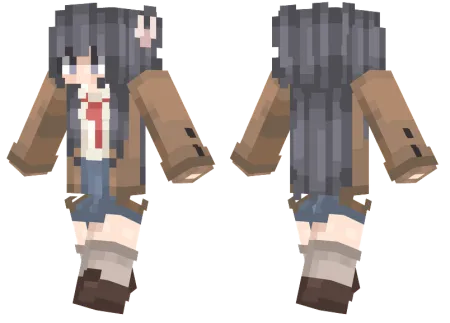
School Girl Hazel Skin mine-craft 3-07-2026, 13:39 399 Skins Drop the standard armor sets and hit the campus with the School Girl Hazel skin, a custom look featuring a warm brown jacket, a sharp red tie, and unique charcoal hair. It is the ideal download for anyone bringing some academic style to their next multiplayer session.Trying to find a solid roleplay outfit that actually looks good in-game is usually a massive headache. Most of the stuff flooding the marketplace is super repetitive or shaded terribly. This particular Bedrock avatar totally breaks that cycle. The creator gave Hazel this awesome charcoal grey hair that immediately catches the eye, especially since everyone else is running around with overused neon colors. Pairing that with the preppy uniformâcomplete with a cozy brown jacket and a bright red necktieâmakes it feel like an actual character rather than a random jumble of pixels.If you spend your weekends hanging out on RP servers or building massive city projects with your friends, having an outfit that actually matches the environment is a total game-changer. The shading on her clothing is perfectly crisp, meaning it translates flawlessly whether you play on a console or mobile. Whenever you get bored of looking like a generic default player, grab this MCPE skin download. Load the file right into your custom Minecraft skins menu, toss it on, and head to class.There is a distinct meta in multiplayer where the most unassuming cosmetics are usually worn by the absolutely most cracked players on the server. Outfitting your avatar in a classic pleated skirt, neat blazer, and relaxed hairstyle totally subverts enemy expectations. While half the lobby is running around in over-designed, bulky medieval armor that blocks their own peripheral vision, you are keeping your visual profile slim and your screen completely uncluttered for those critical bow shots. The pixel shading here is top-tier, utilizing soft pastels and rich earthy tones that make the uniform pop beautifully against the blocky environments of your favorite custom maps. It is the perfect blend of chill vibes and underlying menace when you suddenly pull out a fully enchanted Netherite sword.Beyond just baiting tryhards in Bedwars, this outfit is an absolute staple for community roleplay servers and laid-back SMPs. Dropping into a massive modern city build or a dedicated high school roleplay map feels incredibly awkward when you are dressed as a decaying zombie or a literal fire elemental. This custom Minecraft Bedrock skin anchors your character in reality, providing a high-quality, casual aesthetic that fits perfectly into sprawling architectural projects and chill survival realms. You get to flex a highly detailed, modern wardrobe without looking completely out of place while expanding your automated farms or trading emeralds at the local village.How to Install Skins in Minecraft Bedrock- Download a .png skin (64Ã64 or 128Ã128).- Open Minecraft Bedrock.- Go to Profile (hanger icon) â Edit Character.- Tap Owned â Import â Choose New Skin.- Select your .png file.- Pick a model: Classic (Steve) or Slim (Alex).- Confirm to equip and play.school-girl-hazel-ski_png.zip [1.82 Kb] (downloads: 39)
💬 Comments (0)
Login to leave a comment.
No comments yet. Be the first!