

Black Tee Skin v1.0.0
Overview
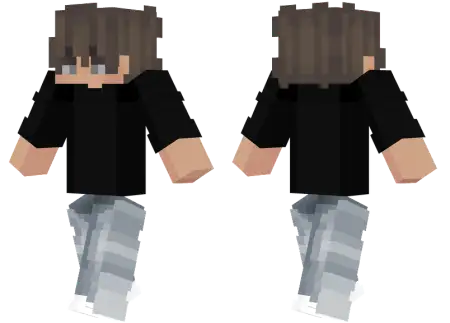
Black Tee Skin mine-craft 3-07-2026, 13:51 399 Skins Keep it clean and simple with the Black Tee skin, a versatile custom look featuring a casual guy rocking a classic black t-shirt. It is the perfect everyday outfit for players wanting a minimal aesthetic without flashy distractions.Let's be real. The game is absolutely flooded with hyper-detailed, glowing outfits that honestly just make your eyes hurt after a while. Sometimes, you just want to log into your favorite SMP and look like a normal dude. This custom Bedrock skin nails that laid-back vibe perfectly. It completely ditches the crazy neon colors and bulky armor sets for a plain black t-shirt and casual pants. It is the ultimate "Iâm just here to grind" aesthetic.Having a minimalist outfit actually has some serious perks, especially if you run casual multiplayer sessions. The dark colors naturally blend into the background if you are sneaking around a PvP server or playing hide-and-seek. Plus, finding clean boy skins for Minecraft with smooth pixel shadingâinstead of looking like a blurry messâcan be surprisingly tough. Thankfully, the creator kept the textures incredibly crisp here.If you are burnt out on wearing loud, obnoxious outfits and just want something comfortable for your next gaming session, this MCPE skin download is an easy fix. Grab the file, toss it straight into your dressing room, and get back to building.Beyond the stealth mechanics, this specific Minecraft Bedrock skin serves as the ultimate canvas for your premium account accessories. Because the torso is completely blacked out, any custom cape you equip absolutely pops against the dark fabric. Whether you are flexing a rare Minecon legacy cape or a glowing animated mantle you picked up from a recent event, the neutral base layer ensures your rare gear grabs all the spotlight. The pixel shading on the shirt itself isn't just a flat, lazy bucket-fill of void black. The texture work includes subtle fabric folds and lighting gradients that react organically to the in-game rendering engine, making the material look like actual clothing instead of a glitched pixel block. It pairs flawlessly with dark jeans, checkered sneakers, or whatever custom leg armor you prefer when assembling your loadout.Loading this fit into your daily rotation guarantees your client won't stutter when rendering complex 3D extrusions during a massive team fight. It syncs cleanly across console, PC, and touch displays without triggering those frustrating desync bugs that often plague heavier, unoptimized model replacements. If you are exhausted from scrolling through hundreds of chaotic, over-designed outfits and just want something that looks incredibly crisp while you grind server leaderboards, this is your new default. Equip the dark fabric, link up your favorite cape, and let your raw mechanical skill do the talking.How to Install Skins in Minecraft Bedrock- Download a .png skin (64Ã64 or 128Ã128).- Open Minecraft Bedrock.- Go to Profile (hanger icon) â Edit Character.- Tap Owned â Import â Choose New Skin.- Select your .png file.- Pick a model: Classic (Steve) or Slim (Alex).- Confirm to equip and play.black-tee-skin_png.zip [1.94 Kb] (downloads: 84)
💬 Comments (0)
Login to leave a comment.
No comments yet. Be the first!