

DarkHearts Skin Pack v1.0.0
Overview
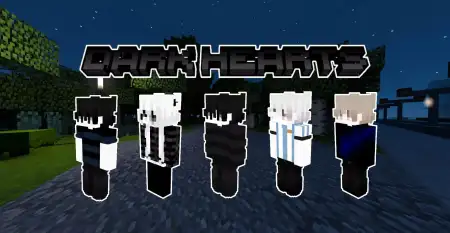
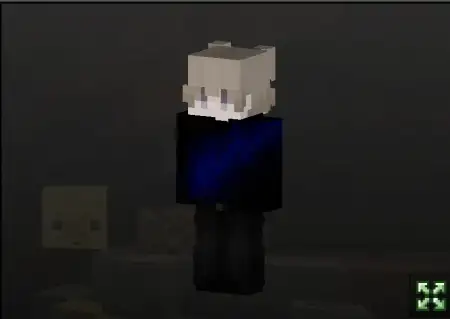
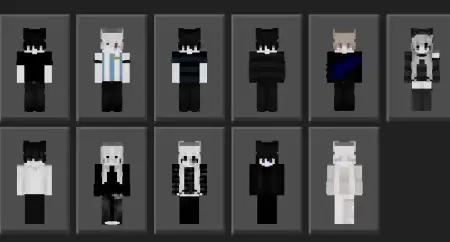
DarkHearts Skin Pack mine-craft 9-07-2026, 14:12 328 Skins The DarkHearts Skin Pack brings a clean, moody aesthetic to your Bedrock worlds with eleven highly detailed, dark-themed outfits. It's an easy way to instantly ditch the basic default look for something with a bit more edge.Finding decent dark aesthetic custom skins that don't just look like a blurry blob of black pixels is surprisingly hard on the marketplace. Most creators just crank the contrast down and call it a day. This MCPE skin pack actually puts effort into the small stuff, using ultra-clean textures and incredibly detailed hair shading to make each character pop. You get 11 different variants in the pack, letting you swap outfits whenever you want to match your mood or the vibe of the server you're hanging out on.The textures display perfectly across every single Bedrock platform, so you'll look just as sharp on an Android phone as you do on a PC or Xbox. It completely skips the annoying 4D models that mess up your hitbox or clip through your diamond chestplates. If youâre tired of the oversaturated, neon trends dominating multiplayer lobbies right now, dropping these Minecraft Bedrock skins into your dressing room is a quick fix. It gives you a premium, low-key look that fits right into any modern survival world.Digging through the roster inside the .mcpack file, you get a solid mix of styles that fit different server vibes. Some variants lean heavily into the modern grunge scene, featuring ripped fishnet sleeves, oversized hoodies stamped with broken-heart emblems, and chunky combat boots that utilize the outer 3D layer for extra depth. Other choices push more into dark fantasy territory, giving you shadowy crowns, glowing crimson eyes, and tattered cloaks that look insane when you are gliding through the Nether on an Elytra. That dual-layer texturing is where the pack really flexes its quality; hair bangs drape naturally over the forehead rather than looking painted onto a flat box.If you spend your weekends grinding hardcore anarchy servers or hosting gothic roleplay sessions on Pocket Edition, having a rotation of skins that share a cohesive theme is a massive plus. You can easily coordinate outfits with your whole clan so nobody accidentally friendly-fires a teammate during a chaotic end-portal brawl. Keep in mind that throwing on bulky enchanted diamond gear will clash horribly with the dark red and black color scheme. You will definitely want to rush Netherite armor as fast as possible in survival worlds, since that dark metallic plating blends seamlessly with the DarkHearts palette.Getting the whole bundle loaded into MCPE or Windows takes one quick tap once the file finishes downloading. Because it installs as a complete skin pack rather than a messy folder of individual PNG images, it creates its own dedicated tab right inside your dressing room menu, letting you swap between different dark-hearted variants on the fly between minigame queues.Quick guide: How to install this Minecraft skinpackDownloaded the .mcpack file? Here is exactly how to get it into your game depending on what device you are using right now.- On Windows or Android: Just click or tap the downloaded file twice. Minecraft will open up on its own and load the skins immediately.- On iPhone or iPad: Save the file, open your Files app, and hold your finger on it. Hit Share, select Minecraft from the list, and the game will handle the rest.To put the skins on, just open Minecraft, head over to the Dressing Room (Profile), click on Classic Skins on the left, find this pack under Owned, and tap Equip.darkhearts.mcpack [30.7 Kb] (downloads: 28)
💬 Comments (0)
Login to leave a comment.
No comments yet. Be the first!