

Neon Phantoms Skin Pack v1.0.0
Overview
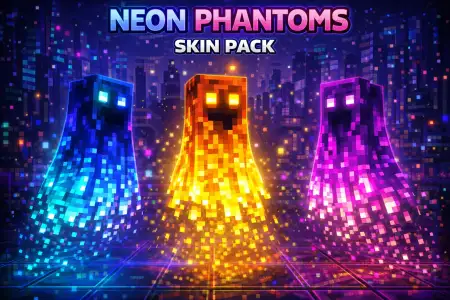
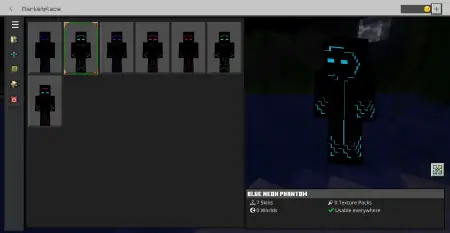
Neon Phantoms Skin Pack mine-craft 9-02-2026, 20:10 1 105 Skins Neon Phantoms Skin Pack is made for players who want that âIâm literally glowingâ look without needing anything complicated. The concept is clean: a black Phantom base with neon patterns layered on top, so the neon pops hard and the skin reads like a bright outline in dark areas. In Minecraft Bedrock, that contrast is what makes these skins feel aliveâblack keeps the silhouette sharp, and the neon does all the flexing.Because these Neon Phantoms come in a bunch of colors, you can match the vibe to whatever world youâre playing. If youâre building a modern base with colored lighting, itâs easy to pick a Phantom color that fits your palette. If youâre more of a PvP or mini-games player, bright neon skins are great because theyâre easy to recognize in motion, especially in chaotic lobbies where everyoneâs jumping around and spamming emotes. Practical tip: choose one color and commit to it as your âserver mainâ so people start associating that Phantom look with you instead of you feeling like a random every session.The creator specifically calls out the Light Blue Neon Phantom as their favorite, and that color tends to look super clean in-game because it pops against dark blocks without feeling too harsh. Itâs a nice pick for night travel, cave exploring, or nether-style builds where the background is darker and the neon effect feels extra strong. Another practical tip: if you like taking screenshots or clips, stand in dim lighting or near lanterns/glowstone so the neon edges feel even brighterâNeon Phantoms Skin Pack is basically built for that âglow in the shadowsâ look.Neon Phantoms Skin Pack is simple on paper, but thatâs why it works. Youâre getting a consistent Phantom theme with color variety, so you can stay on-brand while still switching it up when you want a new mood. If you want a clean neon glow vibe in Minecraft Bedrock without looking messy, Neon Phantoms Skin Pack nails it.How to Install Skins in Minecraft Bedrock- Download a .png skin (64Ã64 or 128Ã128).- Open Minecraft Bedrock.- Go to Profile (hanger icon) â Edit Character.- Tap Owned â Import â Choose New Skin.- Select your .png file.- Pick a model: Classic (Steve) or Slim (Alex).- Confirm to equip and play.neon-phantoms-pack.mcpack [9.84 Kb] (downloads: 79)
💬 Comments (0)
Login to leave a comment.
No comments yet. Be the first!