

Neon Glow Skin Pack v1.0.0
Overview
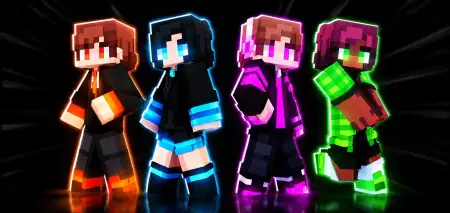
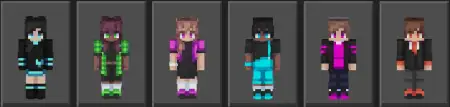
Neon Glow Skin Pack mine-craft 6-07-2026, 04:31 294 Skins The Neon Glow Skin Pack hooks up your Minecraft Bedrock character with four vibrant, high-contrast outfits that actually stand out in the dark. If you want to stop blending into the background on multiplayer servers, this bundle gives you a seriously flashy upgrade.Let's be honest, using standard outfits in competitive minigames just makes you look like everyone else in the lobby. When you are queuing up for BedWars or hanging out in a massive server hub, you want your character model to actually catch some attention. This custom MCPE skin pack does exactly that by mixing deep, dark base tones with crazy bright neon outlines. It creates a sleek, futuristic aesthetic that looks insanely good when you are sprinting around at night, doing parkour, or exploring low-light cave systems.Picture this: you are bridging across the void at 2 AM, the skybox is pitch black, and the only thing your opponents see charging at them is a vibrant streak of ultraviolet energy. That is the exact energy this collection brings to Minecraft Bedrock. Usually, custom character designs rely on muddy browns and greys that make everyone look like they just crawled out of a massive strip mine. This specific drop takes a hard left turn, injecting pure, high-contrast luminescence directly into your virtual wardrobe. Whether you are running late-night survival sessions with the squad or just standing around flexing in giant multiplayer hubs, equipping these custom MCPE avatars practically guarantees you will pull all the focus.Sure, wearing blinding magenta, toxic green, and electric blue might make you a painfully easy target for archers in a sweaty UHC match, but we are playing for maximum style points here, not stealth. The actual pixel shading work on these outfits goes stupidly hard. The designers smartly layered dark, pitch-black base textures underneath the blazing highlights. This creates a wicked visual illusion that the bright colors are physically emitting real light, even if you are playing on a dusty tablet without any heavy shaders or RTX enabled. You get that premium, hyper-futuristic aesthetic without having to swipe your card in the official marketplace. It gives off major sci-fi hacker vibes, which is absolutely perfect for players who want their in-game persona to finally match the chaotic energy of their RGB desk setup.Loading this massive wave of color onto your device is totally painless and takes zero technical knowledge. Because everything is packaged neatly as a standard .mcpack file, injecting these Bedrock skins into your daily rotation requires literally one tap. Both mobile grinders and console veterans can easily cycle through the entire glowing roster straight from the dressing room UI, avoiding the headache of manually cropping PNG files. The base 3D geometry stays perfectly intact, meaning your glowing visors, neon-lined sneakers, and luminescent hoodies will not glitch out when you are in the middle of a sweaty sprint-reset combo. Keep this file active in your global resources, load into a dark server, and prepare to absolutely blind the competition with sheer drip.You get four distinct character designs in this drop, so you and your regular squad can easily coordinate a matching team look without running the exact same file. Because they are formatted specifically for modern versions, these custom Minecraft Bedrock skins render perfectly whether you play on mobile, console, or PC. You won't have to deal with weird texture clipping when you throw on a chestplate or start swinging a sword. If you are tired of a boring locker and want to add some serious flash to your loadout, grab this neon Minecraft skin download, equip your favorite colorway, and light up your next lobby.Quick guide: How to install this Minecraft skinpackDownloaded the .mcpack file? Here is exactly how to get it into your game depending on what device you are using right now.- On Windows or Android: Just click or tap the downloaded file twice. Minecraft will open up on its own and load the skins immediately.- On iPhone or iPad: Save the file, open your Files app, and hold your finger on it. Hit Share, select Minecraft from the list, and the game will handle the rest.To put the skins on, just open Minecraft, head over to the Dressing Room (Profile), click on Classic Skins on the left, find this pack under Owned, and tap Equip.neon-glow-skins.mcpack [10.47 Kb] (downloads: 17)
💬 Comments (0)
Login to leave a comment.
No comments yet. Be the first!