

Axolotl Skin v1.0.0
Overview
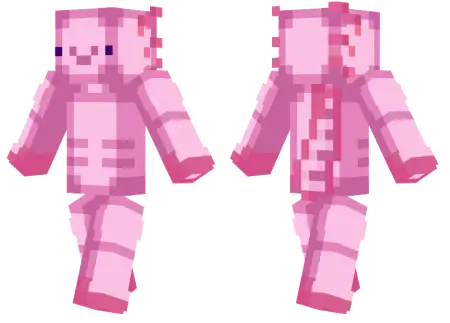
Axolotl Skin mine-craft 4-07-2026, 07:46 323 Skins Bring the absolute cutest mob from the Caves & Cliffs update straight to your character model with the Axolotl Skin. It is the perfect custom look for anyone wanting to flex some adorable aquatic vibes on their next multiplayer server.Letâs be real, ever since Mojang dropped these little guys into the game, everyone has been obsessed with finding them in lush caves and hoarding them in water buckets. But honestly, why just carry one around when you can literally play as one? If your current outfit is just another generic edgy teen in a hoodie or a basic Steve edit, it is definitely time for a major refresh. This custom Minecraft skin perfectly translates that iconic derpy face, the bright pink color palette, and those little side gills into a really clean pixel art format.The actual pixel work deserves serious credit for translating a tiny aquatic mob into a full-scale bipedal model without making it look like a cursed sleep paralysis demon. The bright, high-contrast pinks pop aggressively against dark environments, which makes mapping out a massive Lush Cave or exploring the Deep Dark feel weirdly hilarious. You look completely out of place sprinting across a desolate Nether wastes biome, which is exactly why it works. It brings a chaotic, lighthearted energy to stressful survival runs, giving your squad something bright to track when the expedition goes sideways.For realm owners hosting custom SMP events or minigame tournaments, forcing the entire lobby to equip this amphibious drip creates absolute visual pandemonium. Imagine twenty neon-pink amphibians frantically trying to bridge across a lava lakeâit is pure content. Plus, the geometry stays incredibly clean. You do not have to worry about clunky, oversized hitboxes blocking your peripheral vision while lining up a crucial bow shot, keeping your first-person view clear for actual combat.Loading this into your Bedrock character creator takes zero effort, bypassing the need for heavy resource packs or sketchy file imports that crash mobile clients. It syncs up flawlessly across console, PC, and touch interfaces so you can maintain your ridiculous aquatic aesthetic no matter what platform you are grinding on. Equip the gills, grab your favorite enchanted weapon, and go terrorize the server with a smile.Showing up to a sweaty Bedwars match or logging into a serious survival SMP looking like a giant pink amphibian is an absolute power move. It is funny, it stands out instantly, and it guarantees you will get some reactions from your friends. Finding high-quality Minecraft Bedrock skins that actually look like the mobs they are based on can be a headache, but the shading on this one is incredibly polished. It does not look like a messy, flat blur when you are sprinting around. If you are ready to ditch the boring human outfits, grab this MCPE skin download, toss it into your dressing room, and go terrorize some ocean monuments.How to Install Skins in Minecraft Bedrock- Download a .png skin (64Ã64 or 128Ã128).- Open Minecraft Bedrock.- Go to Profile (hanger icon) â Edit Character.- Tap Owned â Import â Choose New Skin.- Select your .png file.- Pick a model: Classic (Steve) or Slim (Alex).- Confirm to equip and play.axolotl_png.zip [1.31 Kb] (downloads: 29)
💬 Comments (0)
Login to leave a comment.
No comments yet. Be the first!