

Rainbow Creeper Skin v1.0.0
Overview
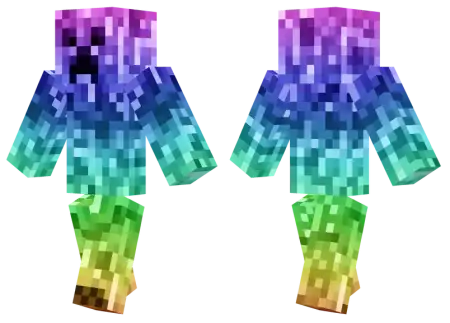
Rainbow Creeper Skin mine-craft 4-07-2026, 07:57 339 Skins Standard creepers are terrifying purely because they blend perfectly into the grass right before they blow up your storage room. This skin takes that stealthy, camouflage design and completely throws it out the window in favor of pure, eye-catching chaos.Rocking a Rainbow Creeper skin is essentially a flex. You aren't trying to hide in the trees; you are making sure everyone on the server sees exactly who is sprinting at them from across the biome.Blending into a dark oak forest wearing dirty moss-green textures is fine if you like hiding, but lighting up a pitch-black cave with pure chromatic chaos sends a completely different message. The Rainbow Creeper skin grabs the most infamous mob silhouette in the sandbox and blasts it with a wild, multi-color spectrum that refuses to go unnoticed.Everybody recognizes that four-legged silhouette from a mile away, yet watching it radiate deep purples, acid greens, hot pinks, and blazing yellows breaks people's brains in an instant. The palette doesn't feel like a muddy gradient slapped over a default template; the transitions between neon tones look crisp, giving the whole outfit an electric, almost retro-arcade glow. Darker pixel seams run along the joints and underbelly to retain that signature pixelated chunkiness, meaning the character model keeps its iconic cubic definition instead of turning into a smeared blur when viewed across wide render distances.Why you should add this to your locker:Maximum Visibility: The vibrant, multi-colored gradient completely pops against standard Minecraft terrain, making it an awesome choice for minigames, PvP, or just running around a bustling realm.Multiplayer Trolling: There is something inherently funny about replacing the game's most anxiety-inducing mob with a walking, glowing rainbow. You still get the classic creeper face, just with a completely absurd aesthetic.A Break from the Norm: If you are tired of running the exact same edgy PvP skins, anime characters, or basic Steve variants, this is a brilliantly loud way to switch things up.It is a simple, highly colorful twist on Minecraft's most iconic monster that guarantees you won't blend into the background.How to Install Skins in Minecraft Bedrock- Download a .png skin (64Ã64 or 128Ã128).- Open Minecraft Bedrock.- Go to Profile (hanger icon) â Edit Character.- Tap Owned â Import â Choose New Skin.- Select your .png file.- Pick a model: Classic (Steve) or Slim (Alex).- Confirm to equip and play.rainbowcreeper_png.zip [3.75 Kb] (downloads: 25)
💬 Comments (0)
Login to leave a comment.
No comments yet. Be the first!