

Itachi Skin v1.0.0

Overview
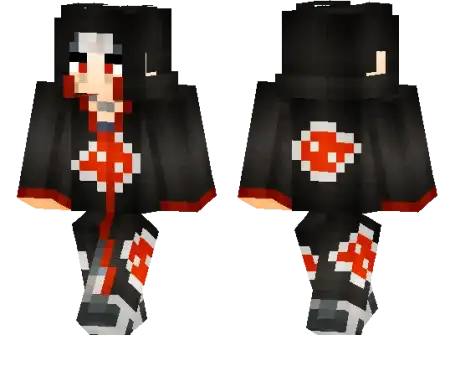
Itachi Skin mine-craft 21-11-2025, 06:29 873 Skins Itachi Skin puts you right into your world as the quiet, overpowered legend in the flowing Akatsuki cloak, covered in those red clouds everyone recognizes in a second. Youâre still just a regular player mechanics-wise, but the vibe changes completely the moment you load into a world with this skin on.In survival, the Itachi Skin works great if you like playing the âsilent protectorâ of the server. Roam through villages at night, clean up mobs around your friends, and just walk off like nothing happened. On PvP servers, the dark colors of the cloak look clean in arenas and tight corridors, so you always look composed even when fights get messy.For roleplay worlds, the Itachi Skin is basically a must if your crew is into anime-style clans, rogue ninjas, or drama-heavy storylines. Pair it with moody builds, hidden bases, and long tunnels under your village, and youâve got a full vibe going. If you want your character to feel mysterious and a little dangerous without saying a word in chat, Itachi Skin is the way to go.How to Install Skins in Minecraft Bedrock- Download a .png skin (64Ã64 or 128Ã128).- Open Minecraft Bedrock.- Go to Profile (hanger icon) â Edit Character.- Tap Owned â Import â Choose New Skin.- Select your .png file.- Pick a model: Classic (Steve) or Slim (Alex).- Confirm to equip and play.itachi-skin_1_png.zip [3.87 Kb] (downloads: 94)
💬 Comments (0)
Login to leave a comment.
No comments yet. Be the first!