

Crimson Slaughter Skin v1.0.0
Overview
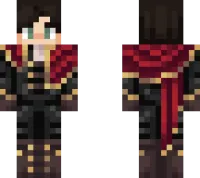
Crimson Slaughter Skin mine-craft 24-02-2026, 11:51 449 Skins Crimson Slaughter Skin is built for players who want their character to look dangerous before the fight even starts. The name alone gives off heavy combat energy, and the crimson/red theme makes it feel like a skin made for war, raids, and chaotic survival nights. Itâs the kind of cosmetic that fits right into darker worlds and battle-focused gameplay.In Minecraft Bedrock, Crimson Slaughter Skin works especially well for PvP because the look feels intense and focused without needing flashy effects. It also fits survival worlds where you lean into combat, mob hunting, or fortress builds, because the skin already gives your character that âbattle-hardenedâ vibe. If youâre running a faction server or roleplay world, this skin can easily work as a warlord, elite fighter, or boss-type character.Crimson Slaughter Skin is also a strong screenshot skin thanks to the red-heavy style, especially in Nether builds, dark castles, or night scenes where the color pops hard. If you want a Minecraft Bedrock skin that feels aggressive, themed, and memorable, Crimson Slaughter Skin is a great one to keep in your rotation.How to Install Skins in Minecraft Bedrock- Download a .png skin (64Ã64 or 128Ã128).- Open Minecraft Bedrock.- Go to Profile (hanger icon) â Edit Character.- Tap Owned â Import â Choose New Skin.- Select your .png file.- Pick a model: Classic (Steve) or Slim (Alex).- Confirm to equip and play.crimson-slaughter-skin2_png.zip [3.79 Kb] (downloads: 30)
💬 Comments (0)
Login to leave a comment.
No comments yet. Be the first!