

A57RO Skin v1.0.0
Overview
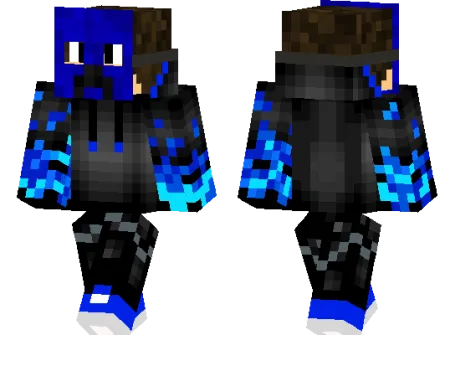
A57RO Skin mine-craft 24-02-2026, 10:28 479 Skins A57RO Skin is a simple idea, but it hits fast because the design is easy to recognize in-game. The blue creeper mask gives your character a strong identity right away, and it feels different from the usual green creeper-themed skins. It has that clean âmasked playerâ vibe that works whether youâre playing solo survival or jumping into a busy server.In regular Minecraft Bedrock gameplay, A57RO Skin fits almost any world style. It looks good in caves, dark builds, and night exploration where the creeper theme matches the mood, but the blue color also helps it stand out in daylight instead of blending into the background. If you play PvP, the mask design gives your character a more serious look without being overdesigned or messy.A57RO Skin is also a nice choice for players who want a themed skin that still feels flexible. You can use it for survival, minigames, roleplay, or just as your everyday main skin. If you like creeper-inspired cosmetics but want something cleaner and more unique, A57RO Skin is a solid pick for your Minecraft Bedrock rotation.How to Install Skins in Minecraft Bedrock- Download a .png skin (64Ã64 or 128Ã128).- Open Minecraft Bedrock.- Go to Profile (hanger icon) â Edit Character.- Tap Owned â Import â Choose New Skin.- Select your .png file.- Pick a model: Classic (Steve) or Slim (Alex).- Confirm to equip and play.a57ro_1_png.zip [3.48 Kb] (downloads: 24)
💬 Comments (0)
Login to leave a comment.
No comments yet. Be the first!