

Zombified Creeper Skin v1.0.0
Overview
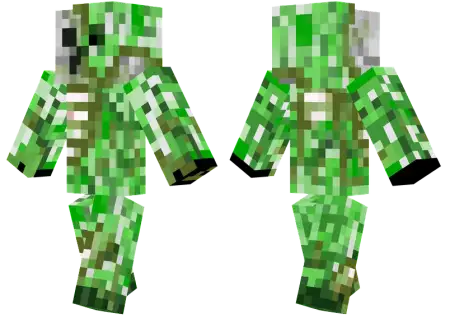
Zombified Creeper Skin mine-craft 4-07-2026, 07:39 334 Skins Give your favorite explosive mob a terrifying undead makeover with the Zombified Creeper skin, blending two classic hostile monsters into one sick design. It is the perfect custom look for players wanting to freak out their friends on their next multiplayer server.I have seen a million different variations of the standard green creeper outfit over the years. Almost every friend group has that one guy in the SMP who wears the basic mob suit just to troll people and blow up bases. But merging that concept with a zombie? That is actually a really creative twist. This design takes the iconic face we all dread and gives it a rotting, post-apocalyptic overhaul. You get exposed ribs, ripped flesh textures, and hollowed-out eyes. It completely shifts the aesthetic from a basic prankster to straight-up horror.Just when you thought the pitch-black nights in your survival world couldn't get any more stressful, some genius decided to fuse the sandbox's most silent explosive with a decaying, flesh-eating walker. Equipping the Zombified Creeper Skin is the ultimate way to send a wave of absolute panic through your multiplayer realm, letting you stalk the shadows as an undead, detonating abomination that looks like it crawled straight out of a forgotten plague biome.Combining two of the most iconic hostile mobs in the game might sound like chaotic mad science, but the execution here is a masterclass in survival-horror aesthetic. This is not just a lazy recolor of the default green mascot; it is a heavily textured, gritty overhaul packed with visceral, rot-infected detailing. Pixel artists went all out, layering sickly, peeling moss-greens against dark, exposed tissue, skeletal rib fragments, and shredded, soil-stained clothing that hangs off the bipedal model.Running around a dark cave system or an abandoned village feels way more intimidating when you are rocking this undead vibe. Finding high-quality Minecraft skins that do not look like a blurry mess can be a massive struggle, but the pixel shading here is surprisingly crisp, especially on the torn clothing details. It holds up great whether you are grinding on a competitive Bedwars network or just surviving in a private realm. If you are ready to refresh your character and bring some spooky energy to your daily game, you need to grab this custom MCPE skin download. Toss the file into your Bedrock dressing room and go cause some panic.How to Install Skins in Minecraft Bedrock- Download a .png skin (64Ã64 or 128Ã128).- Open Minecraft Bedrock.- Go to Profile (hanger icon) â Edit Character.- Tap Owned â Import â Choose New Skin.- Select your .png file.- Pick a model: Classic (Steve) or Slim (Alex).- Confirm to equip and play.zombifiedcreeper_png.zip [3.62 Kb] (downloads: 14)
💬 Comments (0)
Login to leave a comment.
No comments yet. Be the first!