

Zombie Steve Skin v1.0.0
Overview
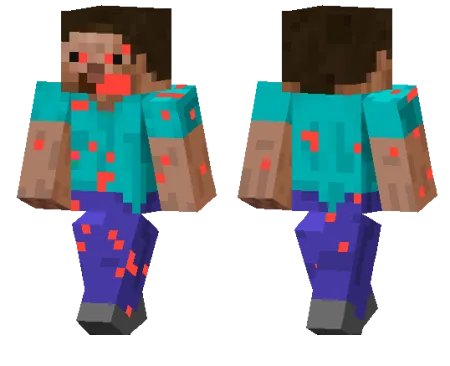
Zombie Steve Skin mine-craft 24-02-2026, 10:04 496 Skins Zombie Steve Skin is a simple idea, but it works really well because it flips the most recognizable character look in Minecraft into something creepy. Instead of a totally new style, it keeps that familiar Steve vibe and turns it into a zombified version, which makes it feel instantly readable in-game. The result is great for players who want a horror touch without using an overdesigned skin.This skin fits perfectly in survival worlds, especially if you like night exploration, cave runs, or abandoned-base builds. Running around as a zombie version of Steve makes normal gameplay feel a little more chaotic, and it looks especially good in darker areas where the undead theme stands out more. Itâs also a fun pick for Halloween maps, apocalypse roleplay, or multiplayer sessions where everyone shows up with themed skins.Zombie Steve Skin is also nice because it stays close to the classic Minecraft style. It doesnât need flashy details to be funâthe whole appeal is that it feels like âSteve, but infected.â If you want a clean, recognizable skin with a spooky twist, Zombie Steve Skin is an easy one to use in your regular rotation.How to Install Skins in Minecraft Bedrock- Download a .png skin (64Ã64 or 128Ã128).- Open Minecraft Bedrock.- Go to Profile (hanger icon) â Edit Character.- Tap Owned â Import â Choose New Skin.- Select your .png file.- Pick a model: Classic (Steve) or Slim (Alex).- Confirm to equip and play.zombie-steve_1_png.zip [3.06 Kb] (downloads: 7)
💬 Comments (0)
Login to leave a comment.
No comments yet. Be the first!