

Zombie Skin Pack v1.0.0
Overview
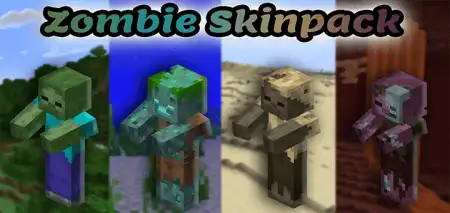
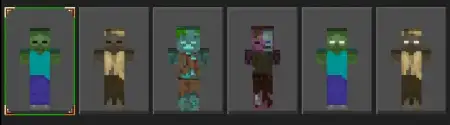
Zombie Skin Pack mine-craft 20-09-2025, 15:28 2 034 Skins Zombie Skin Pack is your all-in, no-fluff way to go full undead in Minecraft Bedrock. Itâs a straight shot of fan service: skins pulled from the actual mob textures, plus new variants to keep lobbies from looking like clones. You get the usual suspectsâclassic Zombie, Drowned, Husk, Zombie Villagerâand a handful of original takes, capped off with Herobrine zombie flavors for that âdid you just see that?â vibe. The extra touch is the built-in zombie arm animations (idle and attack), so your swings look the part instead of just being âguy in green clothes.âI ran this on a Halloween survival night and it sold the theme instantly. In towns, everyone picked a different variant so callouts made sense: âHusk on farms,â âVillager in library,â âDrowned at docks.â For minigames, itâs perfect for Infected or Murder Mysteryâundead skins on one team, survivors on the other, clean reads even in low light. Screenshots slap, too; because the pack sticks to vanilla art, it plays nice with most shader/texture combos without the plastic look.A few tips from testing: if youâre doing roleplay, assign variants by biome (Drowned for harbor guards, Husks for desert raiders) and your server gets instant world-building. For PvP nights, use the Herobrine zombie skins as âbossâ rolesâeasy to spot, fun to chase. And if you stream, these read well at a glance; silhouettes match the mobs you already know, so viewers catch the joke immediately.If you want a zombie look that feels true to vanilla, scales to events, and doesnât fight your pack stack, Zombie Skin Pack is a plug-and-play win for Bedrock.How to Install Skins in Minecraft Bedrock- Download a .png skin (64Ã64 or 128Ã128).- Open Minecraft Bedrock.- Go to Profile (hanger icon) â Edit Character.- Tap Owned â Import â Choose New Skin.- Select your .png file.- Pick a model: Classic (Steve) or Slim (Alex).- Confirm to equip and play.zombie-skinpack.mcpack [17.8 Kb] (downloads: 134)
💬 Comments (0)
Login to leave a comment.
No comments yet. Be the first!