

White Sapphire Skin v1.0.0
Overview
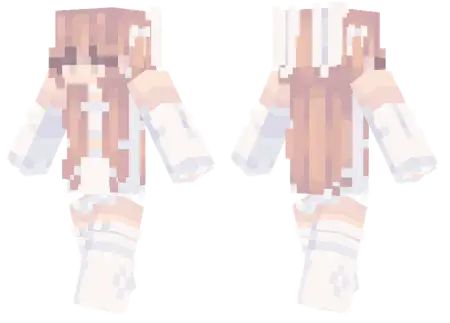
White Sapphire Skin mine-craft 3-07-2026, 13:23 423 Skins Swap out your boring default looks for the White Sapphire Skin, a stunningly clean aesthetic fit complete with matching bunny ears and boots. Itâs the ultimate style upgrade if you want to stand out on your favorite Bedrock servers.Letâs be real, finding cute Minecraft skins that don't look completely cluttered is a massive chore. If you're hunting for premium Minecraft Bedrock skins, this specific design keeps things incredibly sleek and high-end, giving your character a bright, monochromatic look that pops instantly against standard vanilla blocks. The star of the show is definitely the matching white bunny ears and stylish boots, blending a cozy streetwear vibe with a bit of a playful anime edge.There is a massive trend right now in the multiplayer scene where everyone is just drowning in over-designed, hyper-cluttered cosmetics. You load into a match and see a blinding mix of neon demons, bulky robotic armor, and chaotic pixel art that practically hurts your eyes. Throwing on this specific cosmetic entirely bypasses that loud noise. It leans heavily into a pristine, white-out base layer accented by striking sapphire blue highlights. The centerpiece here is undeniably the matching bunny ears and sleek boots, which bring a totally unexpected, playful vibe to an otherwise icy, regal color palette. The pixel artists nailed the shading, using crisp gradients that make the fabric actually look like high-quality material rather than a flat bucket-fill of plain white. It is minimalist without being boring, capturing that elusive sweet spot between a hardcore competitive profile and a chill, laid-back SMP aesthetic.Do not let the cute accessories fool you; running this fit in a sweaty PvP environment actually provides some solid mechanical benefits. Because the overall silhouette remains tight and adheres strictly to the classic player geometry, you never have to deal with massive 3D extrusions blocking your peripheral vision. When you are tracking a moving target across a Bedwars arena or lining up a precision shot with a fully charged crossbow, visual clarity is absolutely mandatory. The bright white and deep blue contrasts beautifully against darker biomes, making you highly visible to your squad during chaotic team fights, yet the streamlined hitbox means you are not handing the enemy a massive target to aim at. It proves you can rock a highly detailed, premium-looking wardrobe without sacrificing your competitive edge.It is the perfect choice if you spend a lot of time hanging out in multiplayer hubs like The Hive or running custom skyblock maps with your squad. Instead of looking like a generic clone in the lobby, this outfit gives off massive pro-builder or competitive PvP energy without trying too hard. Plus, the crisp white textures look amazing in screenshots, especially if you have a nice shader pack running.If your current wardrobe is feeling a bit stale, this MCPE skin download is the easiest way to refresh your look. Just save the file, import it straight into your custom character creator, and hit the lobbies with an entirely new vibe.How to Install Skins in Minecraft Bedrock- Download a .png skin (64Ã64 or 128Ã128).- Open Minecraft Bedrock.- Go to Profile (hanger icon) â Edit Character.- Tap Owned â Import â Choose New Skin.- Select your .png file.- Pick a model: Classic (Steve) or Slim (Alex).- Confirm to equip and play.white-sapphire-skin_png.zip [1.67 Kb] (downloads: 56)
💬 Comments (0)
Login to leave a comment.
No comments yet. Be the first!