

VDX: Java/Desktop UI Addon v1.0.0


Overview
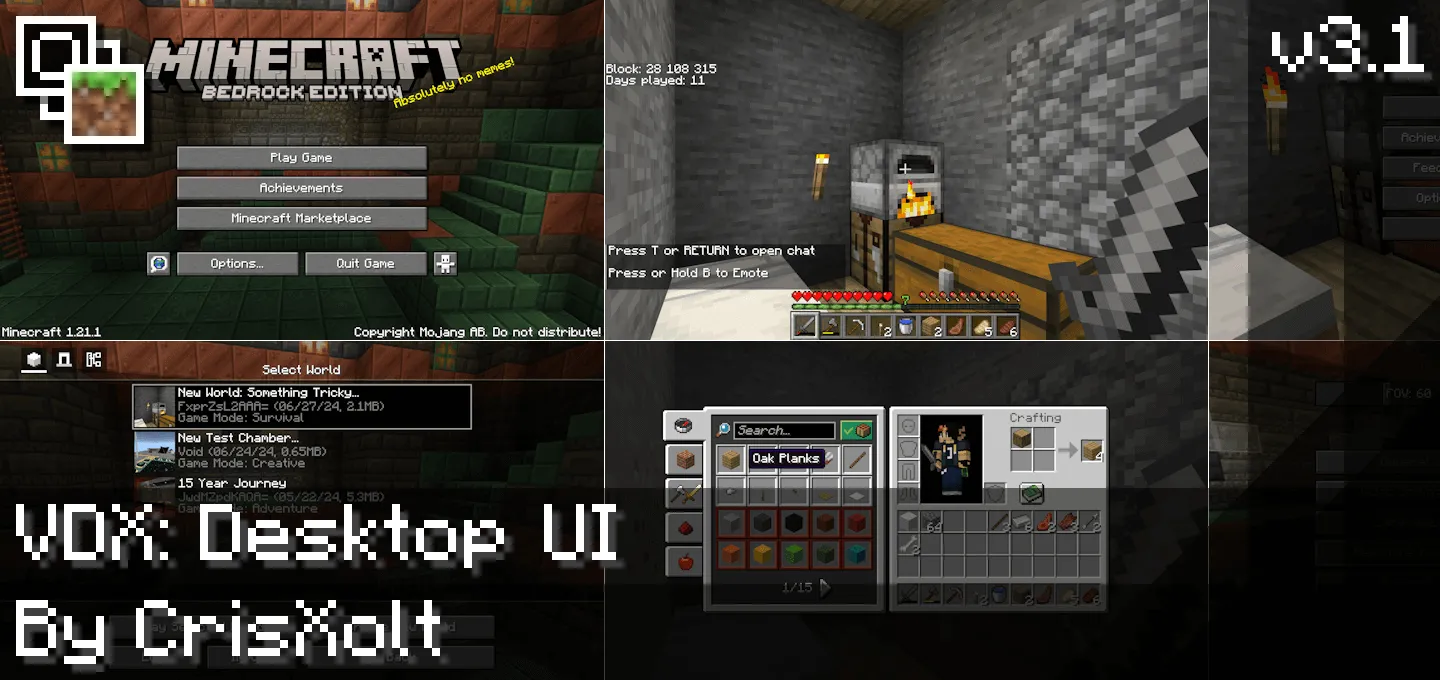
VDX: Java/Desktop UI Addon mine-craft Today, 07:41 10 504 Mods 1.26 / Mods 1.21 VDX: Java/Desktop UI Addon will improve the game interface and your game experience.You boot in and the clutter melts away: cleaner panels, tighter spacing, readable text, and a layout that stops fighting you when youâre juggling stacks mid-fight or crafting on the clock. It doesnât touch gameplay at allâyour world, rules, and achievements stay the sameâVDX just makes the interface behave like a proper desktop client.In survival, the difference shows up fast. Sorting a stuffed chest doesnât feel like a chore; drag, drop, split, done. Crafting chains are easier to follow because the screen breathes, and youâre not hunting for buttons buried under visual noise. Villager trading becomes less âmenu wrestlingâ and more âpick, confirm, move on,â which is perfect when a raid horn goes off and youâre trying to kit up on the fly. Building nights get smoother too: swapping blocks from hotbar to storage, renaming gear on an anvil, and flicking between furnaces and chests all click without that Bedrock UI drag youâve probably learned to tolerate.What makes VDX an absolute god-tier download for the community is the sheer amount of customization baked directly into the pack. It isn't just a basic, lazy copy-paste job. The developer included several distinct sub-profiles to match your specific playstyle. If you are sweating it out on competitive SkyWars or Treasure Wars servers, you can swap over to the dedicated PvP UI, which is specifically modeled after the legendary Java 1.8 combat interface. If you want a smooth hybrid experience, the Mixed UI perfectly blends the best elements of console and PC layouts into one clean package. Every single visual detail has been tweaked for maximum Bedrock Java parity, meaning your hearts, hunger bar, XP bar, and armor icons are properly scaled down and positioned exactly where they belongThe absolute biggest W for this massive MCPE custom GUI overhaul is how incredibly lightweight it is. Because it functions entirely as a client-side resource pack, it doesn't mess with your world behaviors or disable your Xbox achievements. You can safely load it up on your personal survival grind, drop into a massive multiplayer Realm, or dominate minigames on featured servers with zero lag. If you are totally sick of the bloated vanilla menus and want to bring that authentic, high-end PC aesthetic to your phone, tablet, or console, this is an absolutely mandatory install. Lock in this Java UI for Bedrock upgrade, speed up your inventory management, and finally experience the game without the mobile clutter.If you play PvP or speedrun chores between adventures, the desktop-leaning layout keeps your eyes where they belongâon the action. Tooltips are easier to parse at a glance, the HUD feels lighter, and you spend less time stuck in screens and more time actually playing. Setup is simple: add VDX: Java/Desktop UI Addon as a resource pack in Minecraft Bedrock and load your world. I keep it high in the pack order so its interface changes take priority, and it pairs fine with texture packs since itâs UI-only. If you want the feel of Javaâs desktop flow without leaving Bedrock, VDX: Java/Desktop UI Addon is the quality-of-life upgrade that makes every sessionâraids, builds, mining marathonsârun cleaner.Installation:- Download Mod;- Use Minecraft- Open the downloaded file to install;- Select it in the settings;- Have fun!vdx-menus-updatedpatch.mcpack [10.6 Kb] (downloads: 0) vdx-pvpui-v3_2_12alt.mcpack [4.44 Mb] (downloads: 0) vdx-mixedui-v3_2_12alt.mcpack [4.52 Mb] (downloads: 0) vdx-desktopui-v3_2_12main.mcpack [4.6 Mb] (downloads: 0)
💬 Comments (0)
Login to leave a comment.
No comments yet. Be the first!