

Super Stick Sword Mod / Addon v1.0.0

Overview
/ Addons / Mods 1.21
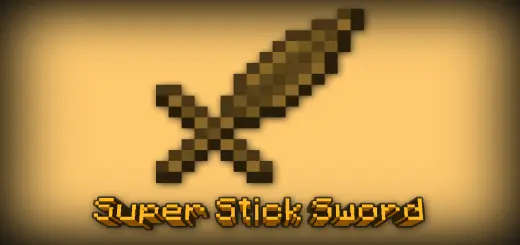
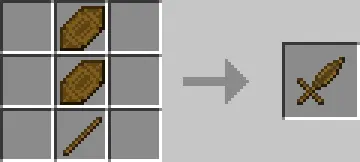
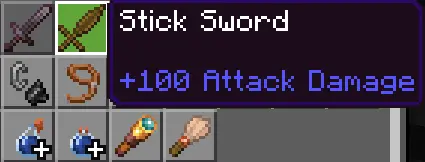
Super Stick Sword mod is a straight port of the Java favorite that turns a humble stick meme into a real endgame blade for Minecraft Bedrock. The catch is brutal and hilarious: the Stick Sword deals 100 damage and carries 2,500 durability, but crafting it demands two Octuple-Compressed Sticks stacked above a single regular stick—a recipe that looks simple on paper and absolutely wrecks your wood supply in practice.
This thing is a commitment run. You’re not grabbing it early; you’re planning for it. I set up spruce or jungle tree banks with tight rows, keep an axe rotation ready, and feed bone meal from a skeleton or composter farm to keep the saplings cycling. The compression ladder is where you’ll feel it—keep smashing sticks into higher tiers until you hit Octuple-Compressed, then do it again because you need two. It’s that classic “nearly there… nope, still not enough” grind that turns a base into a real operation.
Once it’s forged, the Stick Sword changes your tempo. Most mobs drop in a single swing, elites fold before they become a problem, and raids turn into cleanup duty instead of slugfests. The durability is no joke, either—you’re not babying this thing between fights. I use it as a boss opener, a panic button in caves, and a server flex when we host arena nights. It’s also just funny; after hours of logging and crafting, pulling out a stick-based blade that deletes threats feels like the punchline you earned.
A few quality tips from the grind: farm tall trees for better wood-per-chop, stash crafted sticks in labeled chests so you don’t lose track of tiers, and only convert what you’re ready to commit—you can’t uncompress. If you want a clean Minecraft Bedrock challenge with a legit payoff, Super Stick Sword hits exactly the right nerve: absurd inputs, massive output, and a weapon that turns “just one more stack” into your new personality.
Installation Mod:
- Download the .mcaddon / .mcpack;
- Open the file to import into the game;
- In World Settings → Resource Packs and Behavior Packs, enable it (turn on Experiments if needed);
- Have fun!
Super Stick Sword mod is a straight port of the Java favorite that turns a humble stick meme into a real endgame blade for Minecraft Bedrock. The catch is brutal and hilarious: the Stick Sword deals 100 damage and carries 2,500 durability, but crafting it demands two Octuple-Compressed Sticks stacked above a single regular stick—a recipe that looks simple on paper and absolutely wrecks your wood supply in practice.
This thing is a commitment run. You’re not grabbing it early; you’re planning for it. I set up spruce or jungle tree banks with tight rows, keep an axe rotation ready, and feed bone meal from a skeleton or composter farm to keep the saplings cycling. The compression ladder is where you’ll feel it—keep smashing sticks into higher tiers until you hit Octuple-Compressed, then do it again because you need two. It’s that classic “nearly there… nope, still not enough” grind that turns a base into a real operation.
Once it’s forged, the Stick Sword changes your tempo. Most mobs drop in a single swing, elites fold before they become a problem, and raids turn into cleanup duty instead of slugfests. The durability is no joke, either—you’re not babying this thing between fights. I use it as a boss opener, a panic button in caves, and a server flex when we host arena nights. It’s also just funny; after hours of logging and crafting, pulling out a stick-based blade that deletes threats feels like the punchline you earned.
A few quality tips from the grind: farm tall trees for better wood-per-chop, stash crafted sticks in labeled chests so you don’t lose track of tiers, and only convert what you’re ready to commit—you can’t uncompress. If you want a clean Minecraft Bedrock challenge with a legit payoff, Super Stick Sword hits exactly the right nerve: absurd inputs, massive output, and a weapon that turns “just one more stack” into your new personality.
Installation Mod:
- Download the .mcaddon / .mcpack;
- Open the file to import into the game;
- In World Settings → Resource Packs and Behavior Packs, enable it (turn on Experiments if needed);
- Have fun!
💬 Comments (0)
Login to leave a comment.
No comments yet. Be the first!