

Spy Mobs Skin Pack v1.0.0
Overview
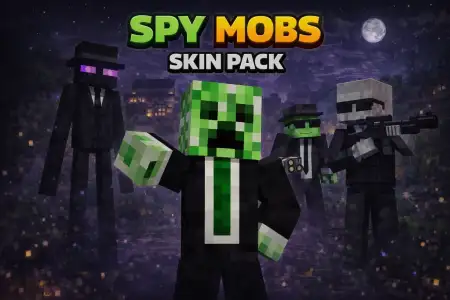
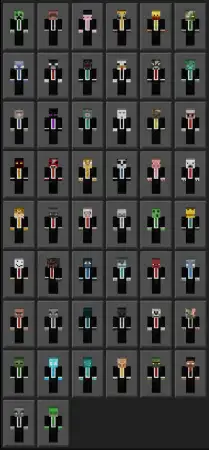
Spy Mobs Skin Pack mine-craft 11-01-2026, 20:00 955 Skins Spy Mobs Skin Packs is the kind of pack that instantly changes the mood of a world without changing any rules. Youâre getting 50 unique skins, and the fun twist is that each one is a real mob from Minecraft, but the theme is âtheyâre all spies.â Thatâs a simple idea, but it opens up a ton of goofy and creative ways to play, especially if youâre the type who likes blending into the world instead of looking like a loud main character.In Minecraft Bedrock survival, wearing a mob skin hits different because you feel like you belong in the environment. Rolling up to a village, creeping around a base, or slipping through the woods at night feels more like youâre undercover. The âspyâ vibe is perfect for stealthy playstyles, prank sessions with friends, or roleplay worlds where everyoneâs pretending thereâs a secret mission happening in the background. You donât need special powers or mechanics for it to workâjust the look alone makes people react differently, especially in multiplayer when someone sees a âmobâ moving like a player and has to do a double take.Spy Mobs Skin Packs also works great for minigames and server hangouts because you can pick a different mob look depending on the mood. It keeps things fresh, and since there are 50 skins, itâs easy for a whole group to choose different options without stepping on each otherâs style. If youâre recording clips or taking screenshots, mob skins are instantly readable on camera, so your theme comes across fast without needing extra explanation.A simple way to get the most out of Spy Mobs Skin Packs is to treat it like a âsecret identityâ pack. Pick one skin as your main undercover look for a world, then swap when you switch activitiesâbuilding, exploring, or messing around with friends. And yeah, if you end up liking the project, the original description literally asks for it, so dropping a comment is part of the vibe too. Spy Mobs Skin Packs is clean, playful, and built for anyone who wants to turn normal Minecraft Bedrock sessions into a quiet little spy movie.How to Install Skins in Minecraft Bedrock- Download a .png skin (64Ã64 or 128Ã128).- Open Minecraft Bedrock.- Go to Profile (hanger icon) â Edit Character.- Tap Owned â Import â Choose New Skin.- Select your .png file.- Pick a model: Classic (Steve) or Slim (Alex).- Confirm to equip and play.spy-mobs.mcaddon [158.4 Kb] (downloads: 101)
💬 Comments (0)
Login to leave a comment.
No comments yet. Be the first!