

Red Spirit Skin v1.0.0
Overview
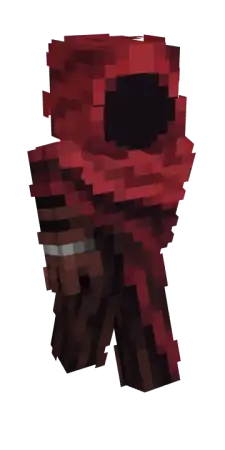
Red Spirit Skin mine-craft 15-01-2026, 15:41 694 Skins Red Spirit Skin is all about showing up with that eerie presence without needing a whole costume pack. The name alone sets the tone, and itâs perfect when you want your character to feel like a wandering legend in your worldâsomething that looks right at home in dark forests, abandoned ruins, or a torch-lit base at midnight.In survival, this skin fits the mood when youâre exploring caves, pushing through storms, or doing late-night supply runs where everything feels a little more intense. It also works great for building sessions if youâre making creepy towns, graveyard-style areas, or anything horror-themed, because your character actually matches the atmosphere instead of looking random in screenshots.On multiplayer or roleplay worlds, Red Spirit Skin makes it easy to lean into a character personaâguardian, ghost, villain, whatever your crew is running with. Itâs a cosmetic swap, so your gameplay stays the same, but your vibe changes instantly, and Red Spirit Skin gives you that âdonât mess with meâ energy the whole session.How to Install Skins in Minecraft Bedrock- Download a .png skin (64Ã64 or 128Ã128).- Open Minecraft Bedrock.- Go to Profile (hanger icon) â Edit Character.- Tap Owned â Import â Choose New Skin.- Select your .png file.- Pick a model: Classic (Steve) or Slim (Alex).- Confirm to equip and play.red-spirit-skin2_png.zip [3.8 Kb] (downloads: 67)
💬 Comments (0)
Login to leave a comment.
No comments yet. Be the first!