

Purple Guy Skin v1.0.0
Overview
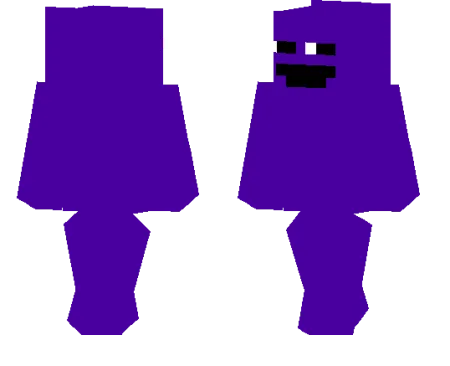
Purple Guy Skin mine-craft 24-02-2026, 10:05 574 Skins Purple Guy Skin is one of those skins that works because it keeps the idea simple and instantly recognizable. The design leans into a full purple look, including the head, so your character stands out right away without needing a ton of extra detail. It gives off a creepy, mysterious vibe that fits darker worlds really well, especially if you like horror-themed gameplay or story-style roleplay.In regular survival, Purple Guy Skin is fun because it changes the mood without changing anything about the mechanics. Youâre still doing the same mining, building, and fighting, but the skin gives your character a more unsettling look, which makes night exploration and cave runs feel a little more dramatic. It also looks great in shadowy builds, abandoned houses, or custom maps where you want that eerie âsomethingâs not rightâ feeling.Purple Guy Skin is also a solid pick for multiplayer if you want a skin people notice fast. Itâs easy to recognize, easy to remember, and fits horror servers, themed events, or just casual sessions where you want a darker style instead of a bright or goofy skin.How to Install Skins in Minecraft Bedrock- Download a .png skin (64Ã64 or 128Ã128).- Open Minecraft Bedrock.- Go to Profile (hanger icon) â Edit Character.- Tap Owned â Import â Choose New Skin.- Select your .png file.- Pick a model: Classic (Steve) or Slim (Alex).- Confirm to equip and play.purple-with-the-head-turned_1_png.zip [1.43 Kb] (downloads: 58)
💬 Comments (0)
Login to leave a comment.
No comments yet. Be the first!