

Moon Creeper Skin v1.0.0
Overview
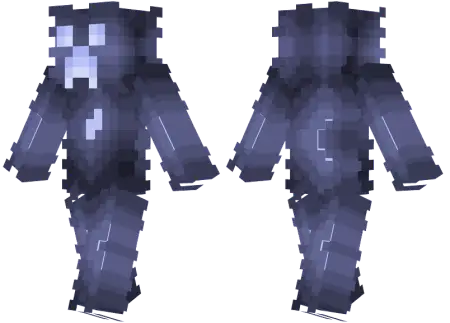
Moon Creeper Skin mine-craft 4-07-2026, 07:55 352 Skins Haunt your next late-night multiplayer session with the Moon Creeper Skin, a terrifying lunar-themed twist on Minecraft's most iconic explosive mob. It is the perfect custom Bedrock download for players wanting to bring some genuine horror to their survival worlds.We all know the sheer panic of hearing that fuse hiss right behind you in the dark. Now, imagine your squad spinning around to see a glowing, ghostly variant staring back. This custom Minecraft skin takes the classic Overworld menace and gives it a super eerie, moonlight-drenched makeover. It completely trades the standard green camouflage for a pale, spectral color palette that looks absolutely terrifying when you are sneaking through a dark spruce forest or creeping outside your friends' bases at midnight.Instead of catching the familiar green outline shambling through your torches, your squad spots a pale, cracked silhouette reflecting lunar rays across the hillside. The visual trick here is all in the texturing. The artist skipped cheap, flat gray pixels and actually built depth into the surface layer, mimicking the rough craters, impact scars, and jagged rock plates of an asteroid belt stray. That haunting frown cuts straight through the pale faceplate with obsidian-dark contrast, giving off zero comedic energy and total hostile presence. It feels less like an earthly mob and more like some forgotten alien fossil that woke up to ruin your bed spawn.Running this fit across Bedrock lobbies changes the entire aesthetic of your survival runs. If you spend most of your game time drilling out massive deepslate quarries, carving obsidian monoliths, or building high-tech space stations at build limit, the regular green monster skin looks wildly out of place. The Moon Creeper naturally vibes with cold stone, basalt deltas, and clean end stone structures. Dropping into a sweaty bridge match or Skywars queue wrapped in dead-planet hues gives your character model an unnerving, stark profile against the void, instantly making your movement harder to read against starry skyboxes and dark stone maps.Because the color palette leans heavily into monochromatic grays, chalky whites, and charcoal undertones, it blends surprisingly well into dark caves and mountain ravines without resorting to sweaty, try-hard pure black skins that get you roasted in voice chat. The shading on the limbs maintains sharp edge definition, meaning your model still pops with clean clarity whether you are running on an iPhone screen, an Xbox setup, or high-end PC monitors with vibrant color profiles dialed all the way up. You do not need external resource packs or shader injectors to make it work; it installs right through the default Bedrock dressing room menu in secondsIf you are tired of running the same default Steve or generic e-boy outfits, switching to a hostile mob disguise is always a massive flex. What makes this specific design so solid is the high-contrast shading. The pixel art uses cool blues and ghostly whites to create an illusion that the character model is actually glowing under the night sky. It is incredibly detailed without looking like a messy blur on your screen. Finding top-tier MCPE skin downloads that actually nail a creepy aesthetic can be surprisingly tough, but this one hits the mark flawlessly. Whether you are grinding PVP minigames or building on a private SMP, grab this Minecraft Bedrock skin download, load it into your character creator, and go cause some heart attacks.How to Install Skins in Minecraft Bedrock- Download a .png skin (64Ã64 or 128Ã128).- Open Minecraft Bedrock.- Go to Profile (hanger icon) â Edit Character.- Tap Owned â Import â Choose New Skin.- Select your .png file.- Pick a model: Classic (Steve) or Slim (Alex).- Confirm to equip and play.moon-creeper-skin_png.zip [1.64 Kb] (downloads: 23)
💬 Comments (0)
Login to leave a comment.
No comments yet. Be the first!