

Journey Begins: Starter Pokémon Skin Pack v1.0.0
Overview
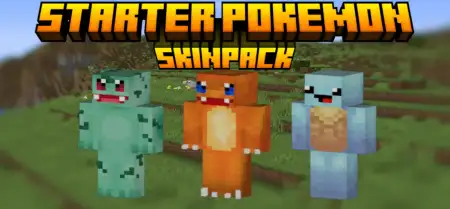
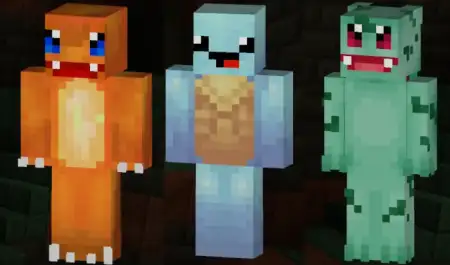
Journey Begins: Starter Pokémon Skin Pack mine-craft 26-09-2025, 21:28 1 018 Skins Journey Begins: Starter Pokémon Skinpack â the classic trio in Minecraft Bedrock so you can wear your favorite starter and hit a fresh world with day-one swagger. Itâs just skins, no gameplay tweaks, and thatâs the charm: clean designs that look right at home next to villagers, stone blocks, and your first wooden hut. You pop into the dressing room, pick Charmander, Squirtle, or Bulbasaur, and suddenly every screenshot feels like a throwback adventure with a Bedrock twist.In survival, the vibes write themselves. Throw on Charmander and sprint out at sunrise like youâre speedrunning gym badgesâcampfire glow at night matches the orange perfectly. Squirtleâs the move for beach seeds and river bases; boat hops, kelp farms, and ocean monument scouting all feel on-brand when youâre rocking the shell. Bulbasaur fits plains and forest builds like a gloveâfarm rows, mossy paths, and a cozy starter house wrapped in leaves. None of this changes stats, but it absolutely changes how the session feels, and your friends will clock it the second you join.On servers, itâs perfect for quick team IDs. Run trio challenges with each starter as a roleâbuilder, explorer, scoutâand your callouts get cleaner just from the silhouettes. In minigames, the skins are readable at a glance across bridges and arenas, so your squad looks organized even before the countdown hits. For role-play nights, post up at a âlabâ spawn, pick your starter, and head out in different directions like a proper journey kickoff.Swapping is instant in the Bedrock dressing room, so you can rotate starters between rounds or match the biome youâre exploring. If you grew up loving these three and want that energy in your current worlds, Journey Begins: Starter Pokémon Skinpack nails itâpure nostalgia, clean fits, and a perfect match for Minecraft Bedrockâs blocky canvas.How to Install Skins in Minecraft Bedrock- Download a .png skin (64Ã64 or 128Ã128).- Open Minecraft Bedrock.- Go to Profile (hanger icon) â Edit Character.- Tap Owned â Import â Choose New Skin.- Select your .png file.- Pick a model: Classic (Steve) or Slim (Alex).- Confirm to equip and play.pokemon.mcpack [13.03 Kb] (downloads: 121)
💬 Comments (0)
Login to leave a comment.
No comments yet. Be the first!