

Imposter Skin v1.0.0
Overview
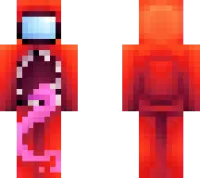
Imposter Skin mine-craft 24-02-2026, 13:08 571 Skins Imposter Skin is one of those skins that instantly makes people react the second you join a world. The whole vibe is obvious in the best wayâit gives your character that suspicious, meme-ready look that fits perfectly in goofy survival sessions and friend-group chaos. You donât need a huge backstory or fancy details with this one; the joke lands fast and everyone gets it.In regular Minecraft Bedrock gameplay, Imposter Skin works great because it fits almost any situation. You can be mining, building, looting, or âaccidentallyâ standing near a blown-up chest room, and the skin makes everything funnier. Itâs especially good in multiplayer because people will start blaming you for stuff even when you did nothing, which is honestly half the fun.Imposter Skin is also a strong pick for minigames, hide-and-seek maps, and casual server play where personality matters more than looking serious. If you like meme skins that are easy to recognize and always get a laugh, Imposter Skin is a perfect one to keep in your Minecraft Bedrock rotation.How to Install Skins in Minecraft Bedrock- Download a .png skin (64Ã64 or 128Ã128).- Open Minecraft Bedrock.- Go to Profile (hanger icon) â Edit Character.- Tap Owned â Import â Choose New Skin.- Select your .png file.- Pick a model: Classic (Steve) or Slim (Alex).- Confirm to equip and play.imposter-skin2_png.zip [5.5 Kb] (downloads: 76)
💬 Comments (0)
Login to leave a comment.
No comments yet. Be the first!