

Herobrine Skin v1.0.0
Overview
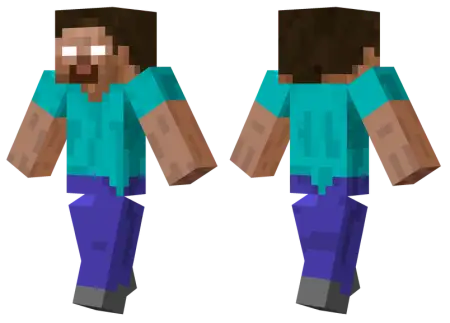
Herobrine Skin mine-craft 14-10-2026, 10:47 520 Skins The classic Herobrine skin lets you step into the shoes of gamingâs most infamous creepypasta and absolutely terrify your server mates. Itâs the ultimate throwback to the golden era of wild Minecraft rumors.We all remember watching those blurry 2010 YouTube videos claiming Notch had a dead brother haunting the game. Even though the developers confirmed a million times that the white-eyed ghost was just a massive community myth, the legend never actually died. Throwing on this custom MCPE skin instantly brings back that vintage paranoia. It takes the iconic, default Steve outfit and simply blanks out the eyes into a soulless white stare. It is a beautifully simple edit, but it still triggers a core memory of pure panic for anyone who played during the early beta days.Crouching behind a tree Line at the edge of your friend's render distance while rocking those iconic glowing white eyes is still the ultimate way to cause pure panic on a multiplayer server. The Herobrine Skin brings the most legendary creepypasta in gaming history straight to your Minecraft Bedrock wardrobe, turning your avatar into a walking jump-scare.Every veteran player remembers the old forum posts about a mysterious ghost stalking single-player worlds, stripping leaves off trees, and digging random two-by-two tunnels underground. Putting on this skin lets you actually become that myth during your late-night Realm sessions. What makes this specific character design hit so hard is how deceptively simple it looks from afar. Because it uses the classic cyan shirt and blue jeans from the default Steve outfit, other players won't immediately clock that something is off until you turn around and those blank, pupil-less eyes lock onto them in a dark cave.If you want to mess with your friends on a private multiplayer Realm, there is honestly no better outfit to equip. Sneak around the edge of their render distance in a dense oak forest, or just stand completely still at the end of a dark mineshaft without holding a torch. The sheer psychological damage you can inflict is hilarious. Because it uses standard dimensions, this Herobrine player model won't glitch out your armor or cause any weird hitboxes while you are pulling your pranks.If you are building up a solid collection of Minecraft Bedrock skins, you literally have to include this piece of internet history. Just don't blame me when you get banned for jump-scaring the server admin.How to Install Skins in Minecraft Bedrock- Download a .png skin (64Ã64 or 128Ã128).- Open Minecraft Bedrock.- Go to Profile (hanger icon) â Edit Character.- Tap Owned â Import â Choose New Skin.- Select your .png file.- Pick a model: Classic (Steve) or Slim (Alex).- Confirm to equip and play.herobrine_png.zip [1.69 Kb] (downloads: 80)
💬 Comments (0)
Login to leave a comment.
No comments yet. Be the first!