

Health Bar Indicator Addon v1.0.0
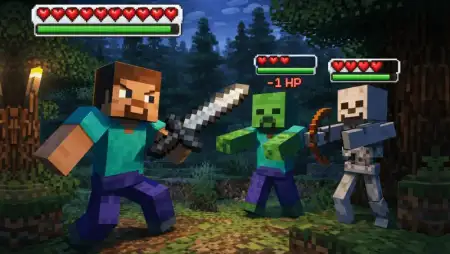
Overview
Health Bar Indicator Addon mine-craft 9-07-2026, 13:51 478 Mods 1.26 / Mods 1.21 The Health Bar Indicator Addon brings a much-needed tactical upgrade to Minecraft Bedrock by overlaying visible health bars directly above every mob you encounter. It completely removes the guessing game from combat, letting you see exactly how much damage you're dealing in real time.Letâs face it, swinging your sword at a beefy mob like a Warden or an Enderman without knowing if theyâre at full health or a single hit away from dying is incredibly frustrating. This MCPE damage indicator mod completely fixes that blind spot. Borrowing a clean, familiar design styleâsimilar to the highly anticipated RPG Hytaleâit plants a dynamic life bar right over the head of every passive animal, hostile monster, or massive boss. It turns messy, spam-click encounters into highly strategic skirmishes, showing you exactly when to push for the final blow or back off to regenerate your hearts.What makes this Minecraft Bedrock combat addon an absolute staple for your active pack folder is its minimal footprint. It integrates seamlessly into your gameplay without cluttered text or rendering lag, making it perfect for both intense custom PvP arenas and chaotic survival worlds. If youâre hunting creepers in deep caves or taking down a classic Wither fight, having that visual data on screen changes everything.What separates this specific MCPE setup from older, clunkier damage indicator scripts is how it handles entity rendering. Previous versions used to hijack base mob files, which completely broke compatibility if you tried to run custom fantasy creatures or weapon mods alongside them. Because this pack hooks into client-side rendering controllers and lightweight tracking, it plays nice with almost any third-party mob addon in your load order. You also get handy subpack options right inside the resource settings menu. Clicking the gear icon lets you toggle between classic heart icons or sleek percentage bars, and you can even set the UI to stay hidden until you actually deal damage so your screen doesn't get cluttered inside crowded animal farms. Getting the tracker active on mobile, console, or Windows PC takes zero experimental toggle headaches. Depending on whether you run the standalone .mcpack resource file for singleplayer or the full .mcaddon bundle on a multiplayer Realm, your Xbox achievements stay 100% intact. Just slide the pack to the very top of your active load order so its UI elements take priority over any custom texture packs you already have installed.Stop guessing your damage output and give your survival runs a massive quality-of-life upgrade. Grab this essential Minecraft PE UI tweak today and take total control of your combat.Installation Mod:- Download the .mcaddon / .mcpack;- Open the file to import into the game;- In World Settings â Resource Packs and Behavior Packs, enable it (turn on Experiments if needed);- Have fun!health-bar-indicator-1_7.mcpack [320.27 Kb] (downloads: 64)
💬 Comments (0)
Login to leave a comment.
No comments yet. Be the first!