

Girl Skin v1.0.0
Overview
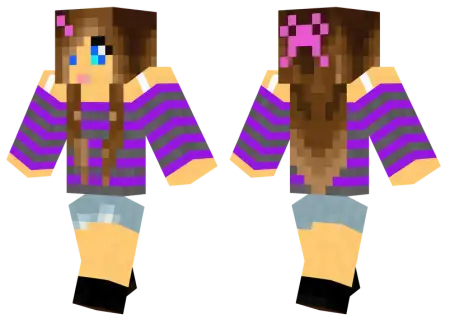
Girl Skin mine-craft 9-07-2026, 14:16 316 Skins The Girl Skin gives your Bedrock avatar a clean, modern aesthetic that actually looks good in-game without relying on over-the-top geometry. Itâs a perfect drop-in replacement if you are completely over the default Alex model.Scrolling through crowded multiplayer lobbies, it's pretty obvious how hard it is to find solid female avatars that aren't a complete eyesore. You usually stumble across clunky designs ported from ten years ago or crazy neon messes that look awful the second you equip iron armor. This specific Minecraft girl skin completely dodges those issues by keeping the design simple and grounded. The creator focused heavily on high-quality pixel art. The shading on the hair and the casual outfit actually blends smoothly instead of looking like a flat, rushed grid of colors. It delivers a laid-back, everyday style that works anywhere. You could be hanging out in a massive city roleplay map or just sweating out a solo survival run, and it still fits the vibe perfectly.Vanilla Alex has been carrying the default female avatar slot for ages, and frankly, that plain green tunic is an absolute eyesore when you drop into a stylized multiplayer lobby. Locking in a custom Girl Skin upgrades your Minecraft Bedrock look immediately, letting you trade basic starter defaults for layered street-ready fits and detailed hair textures without feeding a single cent into the Marketplace machine.Walk into any high-pop server like CubeCraft or Lifeboat, and you can instantly tell who actually cares about their setup versus who just installed the game five minutes ago. Default characters stick out in the worst way possibleâthey look stiff, unshaded, and totally lifeless next to custom avatars. A solid female skin pack fixes that problem by taking full advantage of Bedrockâs outer 3D geometry layer. Instead of painting flat clothes onto a blocky torso, these textures wrap cropped hoodies, oversized flannel shirts, and high-waisted cargo pants around the model with actual depth. Even the footwear gets proper attention, featuring chunky platform sneakers or pastel boots that pop right off the base leg pixels.What really separates a top-tier MCPE skin from amateur pixel art is how the shading handles long hair and accessories. If a texture lacks subtle color gradients, flowing hair just looks like a solid helmet made of clay. The designs here use soft, blended palettes to give bangs, braids, and space buns a real sense of movement, even when your character is just standing still at a crafting table. You also get clean micro-details tucked into the hat layer, like delicate flower crowns, retro sunglasses perched on the forehead, or cat-ear heaBecause it sticks purely to the standard player model, you avoid all the annoying hitbox glitches that come with weird custom geometry. Your elytra wonât clip awkwardly through your shoulders, and your gear renders exactly how itâs supposed to. It imports seamlessly, letting you run this custom MCPE skin on your console, phone, or PC without a single error.Stop blending in with the thousands of default characters running around. Throw this Bedrock female skin into your character creator and give your playthrough a much-needed visual refresh.How to Install Skins in Minecraft Bedrock- Download a .png skin (64Ã64 or 128Ã128).- Open Minecraft Bedrock.- Go to Profile (hanger icon) â Edit Character.- Tap Owned â Import â Choose New Skin.- Select your .png file.- Pick a model: Classic (Steve) or Slim (Alex).- Confirm to equip and play.girl_png.zip [3.47 Kb] (downloads: 5)
💬 Comments (0)
Login to leave a comment.
No comments yet. Be the first!