

Fake Armor Skin Pack v1.0.0
Overview
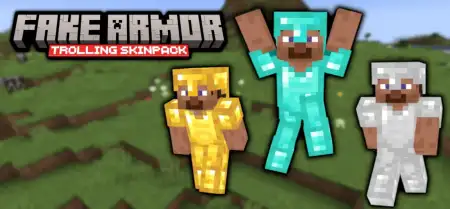
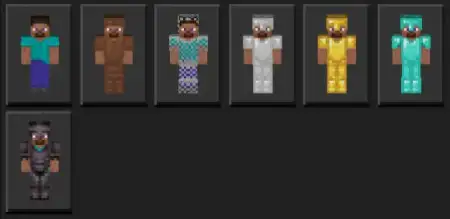
Fake Armor Skin Pack mine-craft 26-09-2025, 16:20 982 Skins Fake Armor Skinpack â the perfect bait-and-switch for Minecraft Bedrock when you want laughs, mind games, or a little chaos without touching gameplay. Itâs six clean Steve-style looks that copy the silhouette and colors of every armor tierâleather, chain, iron, gold, diamond, and netheriteâso at a glance you pass as stacked. Under the hood youâre still in a plain skin with zero armor points, so donât try to tank a creeper; this is pure visual trolling, not a stat boost.In survival, itâs hilarious for raids and village defenses. Stroll up âin diamond,â pretend to lead the charge, then duck behind a wall while your friends realize youâre basically naked. On realms and PvP arenas, itâs all about psychology: bait a cautious player into a fair fight by looking iron instead of netherite, or spook a lobby by rolling âfull netheriteâ with nothing but a wooden sword. The best runs are the subtle onesâblend into a real squad thatâs actually wearing armor and let opponents misread your threat level until itâs too late.Using it is simple: pop open the Bedrock dressing room, pick the armor look that fits the bit, and jump back in. Skins swap fast between rounds, so you can change tiers mid-session to keep people guessing. Right now the pack focuses on Steve-style cuts; if youâre the slim-armed crowd, an Alex variant would be a great next addition. Keep it friendly, set house rules if needed, and remember you still take full damage. If you want low-effort comedy and high-impact mind games, Fake Armor Skinpack lands perfectly on Minecraft Bedrockâclean reads, instant pranks, and endless âwait, you werenât wearing armor?â moments.How to Install Skins in Minecraft Bedrock- Download a .png skin (64Ã64 or 128Ã128).- Open Minecraft Bedrock.- Go to Profile (hanger icon) â Edit Character.- Tap Owned â Import â Choose New Skin.- Select your .png file.- Pick a model: Classic (Steve) or Slim (Alex).- Confirm to equip and play.fake-armor.mcpack [30.03 Kb] (downloads: 84)
💬 Comments (0)
Login to leave a comment.
No comments yet. Be the first!