

Element Hoodie Gamer Skin v1.0.0
Overview
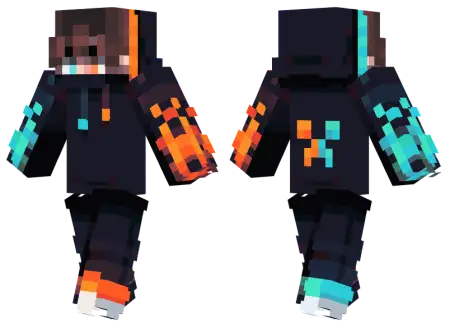
Element Hoodie Gamer Skin mine-craft 3-07-2026, 13:48 381 Skins Take a massive trip down memory lane with the Element Hoodie Gamer Skin, rocking that iconic fire-and-ice creeper design from the golden days of Minecraft. It is the ultimate nostalgic flex for veteran players wanting to bring some old-school flavor to modern Bedrock servers.If you were watching Minecraft YouTube back in 2013, you already know exactly what this outfit represents. Half fire, half water, and a giant creeper face on the backâthis was literally the uniform for every serious PvP sweat and survival let's-player. Finding cool Minecraft skins today usually means sifting through hundreds of overly complicated anime outfits or trendy e-boy streetwear. This custom Bedrock skin takes it right back to the basics. It is loud, it is beautifully blocky, and it immediately screams classic gaming culture.Nothing signals an imminent lobby wipe quite like someone gliding across a Bedwars bridge wearing a neon-infused hoodie with zero fear of falling. The Element Hoodie Gamer Skin turns your avatar into a walking conduit of pure elemental energy, blending urban streetwear aesthetics with raw, vibrant power.Most multiplayer skins lean into one extreme: either you get an edgy shadow-cloaked rogue that vanishes in dark corners, or a bizarre troll outfit meant entirely for cheap laughs. When you sprint down the mid-lane during an intense capture-the-flag match, the contrast between the dark base fabric and glowing elemental seams makes your movement animations look wildly kinetic.From a tactical perspective, running this fit on a crowded SMP or competitive realm sets an instant psychological boundary. Players identify silhouettes fast, and a razor-sharp, modern gamer profile instantly broadcasts that you know how to W-tap and reset sprint combos without breaking a sweat. It looks incredible under dynamic lighting, giving your character an almost supernatural aura during rainy survival excursions or while raiding subterranean trial chambers. Instead of looking like a generic default entity, you carry the visual weight of an end-game champion who just stepped out of a competitive arena.Rocking this aesthetic in a modern multiplayer lobby is basically a veteran badge of honor. It shows everyone in your Bedwars queue that you have been placing dirt blocks since the early days. The pixel art keeps that original raw charm while making sure the shading looks perfectly crisp on your console or mobile device. Whether you are dominating fast-paced minigames or just exploring a new vanilla seed with the squad, this look genuinely hits different. If you are ready to ditch the overly detailed modern fits and embrace pure nostalgia, snag this MCPE skin download. Toss the file into your dressing room and show the new generation how it is done.How to Install Skins in Minecraft Bedrock- Download a .png skin (64Ã64 or 128Ã128).- Open Minecraft Bedrock.- Go to Profile (hanger icon) â Edit Character.- Tap Owned â Import â Choose New Skin.- Select your .png file.- Pick a model: Classic (Steve) or Slim (Alex).- Confirm to equip and play.element-hoodie-gamer-skin_png.zip [1.99 Kb] (downloads: 33)
💬 Comments (0)
Login to leave a comment.
No comments yet. Be the first!