

Debug Screen Pro Addon v1.0.0
Overview
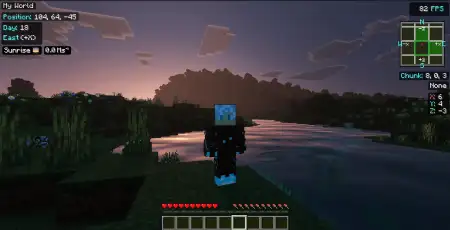
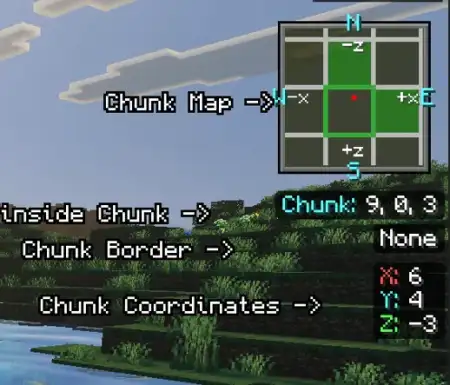
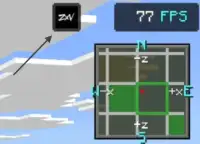
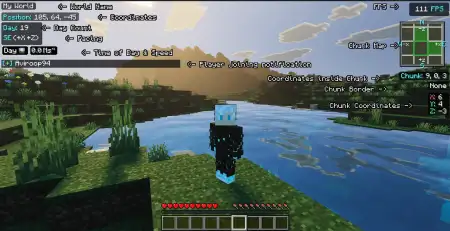
Debug Screen Pro Addon mine-craft 11-07-2026, 10:12 448 Mods 1.26 / Mods 1.21 The Debug Screen Pro Addon finally brings the legendary Java Edition F3 menu over to Bedrock, giving you full access to your coordinates, FPS, and current time without cluttering your screen. It is a massive win for survival players who want hardcore technical info without losing their vanilla progression.Let's face it, missing out on the F3 debug screen is one of the biggest downsides to playing Bedrock Edition. Normally, tracking your exact facing direction or checking your frame rate during massive redstone builds involves a lot of guesswork or ugly, bulky menus. This custom addon completely fixes that by overlaying a clean, HD UI directly onto your screen. You get real-time tracking for your coordinates, a built-in FPS counter, and even custom-designed pixelated icons that track the exact phase of the dayâfrom sunrise to midnightâso phantoms never catch you off guard again.If you are doing any serious technical building on a multiplayer realm, playing blindly without raw game data is just negligent. Standard Bedrock forces you to guess your chunk boundaries and estimate your frame rates, which is an absolute nightmare when you are trying to optimize a massive iron farm or map out a complex slime chunk perimeter. ZenXvedaâs UI overhaul fixes this massive mechanical gap. Hitting F8 on your keyboardâor tapping the custom ZXV HUD button on mobileâinstantly drops a sleek, data-rich overlay directly onto your screen, giving you total spatial awareness.This isn't just a cheap visual imitation; it is a hyper-functional utility suite engineered for power users. The main panel feeds you your exact XYZ coordinates, the specific cardinal direction you are facing, and the precise in-game day phase. But the real game-changers are the performance trackers. You get a live FPS counter to actively monitor how much your massive redstone contraptions or heavy shader packs are tanking your local system. Plus, it renders a real-time chunk minimap complete with visible chunk borders. Try setting up a multi-dimensional mob grinder without knowing exactly where the chunk cuts off, and you will quickly realize why technical players refuse to play without this specific tool. It even includes a real-time speed tracker, which is incredible for testing the efficiency of your custom ice boat highways or Elytra flight paths.The absolute best part about this pack is that it's built entirely as a pure resource pack with zero player.json modifications. That means it is 100% achievement friendly, requires no crazy experimental toggles, and won't conflict with your other favorite animations or gameplay mods. It runs incredibly smooth using lightweight JSON rendering, so you don't have to worry about performance drops on your phone or console. If you're looking for one of the best MCPE utility mods to optimize your next survival realm, this one is an absolute no-brainer.Installation Mod:- Download the .mcaddon / .mcpack;- Open the file to import into the game;- In World Settings â Resource Packs and Behavior Packs, enable it (turn on Experiments if needed);- Have fun!debug-screen-pro-by-zenxveda.mcpack [1.72 Mb] (downloads: 61)
💬 Comments (0)
Login to leave a comment.
No comments yet. Be the first!