

Cyber Knights Skin Pack v1.0.0
Overview
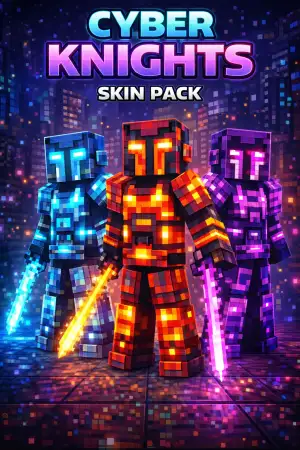
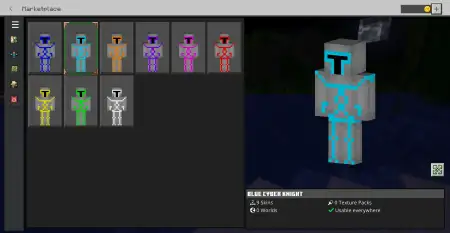
Cyber Knights Skin Pack mine-craft 9-02-2026, 19:33 718 Skins Cyber Knights Skin Pack is built around one clean idea: take a Cyber Knight look and give it a full rainbow of color options so everyone can match their own vibe. That makes it perfect for friend groups, because you can all run the same themed skin style while still being easy to tell apart. In Minecraft Bedrock, thatâs huge for co-op worlds and Realmsânothingâs worse than everyone looking identical when youâre trying to meet up during chaos.The âCyber Knightâ theme fits a lot of popular world styles too. If youâre building modern bases, sci-fi labs, underground tech bunkers, or anything with dark blocks and bright lighting, the knight aesthetic feels right at home. Even in regular survival, it adds a little âcharacter fantasyâ to boring choresâlike youâre not just mining coal, youâre an armored cyber warrior doing supply runs. Practical tip: pick a color that matches your base palette so your screenshots look clean. If your base uses blues and whites, the Light Blue Cyber Knight is an easy match, and itâs also the creatorâs favorite, which usually means itâs the cleanest-looking variant.For multiplayer, Cyber Knights Skin Pack is basically a lobby flex skin. Bright color variants stand out instantly, so your friends can spot you fast, and youâll look consistent across mini-games without having to swap outfits constantly. Another practical tip: if your friend group is doing team games, assign colors as ârolesâ so you can call out whoâs who mid-fightâlike one color for the aggressive rusher, one for the support player, one for the builder whoâs always carrying blocks.Cyber Knights Skin Pack works because it keeps the theme consistent while giving you color freedom. Youâre not choosing between totally different stylesâyouâre choosing which Cyber Knight you want to be today. If you like the cyber-armored look and want options that still feel unified, Cyber Knights Skin Pack is an easy win.How to Install Skins in Minecraft Bedrock- Download a .png skin (64Ã64 or 128Ã128).- Open Minecraft Bedrock.- Go to Profile (hanger icon) â Edit Character.- Tap Owned â Import â Choose New Skin.- Select your .png file.- Pick a model: Classic (Steve) or Slim (Alex).- Confirm to equip and play.cyber-knight-pack.mcpack [14.5 Kb] (downloads: 57)
💬 Comments (0)
Login to leave a comment.
No comments yet. Be the first!