

BLUE ARCHIVE COLLECTION Skin Pack v1.0.0


Overview
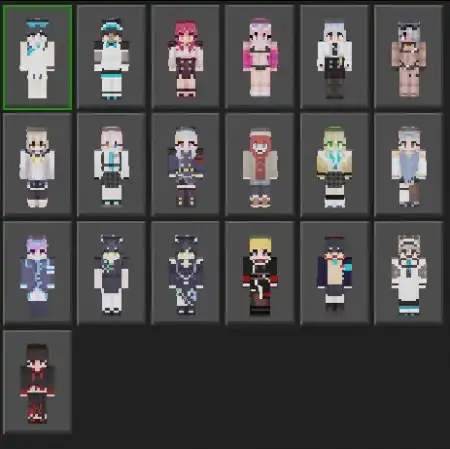
BLUE ARCHIVE COLLECTION Skin Pack mine-craft 20-11-2025, 02:33 1 180 Skins BLUE ARCHIVE COLLECTION Skin Pack â a rotating gallery of roughly twenty community-made skins from credited players, built to drop straight into Minecraft Bedrock without killing the vibe youâve already got. The fun hook is the variety: the pack isnât locked to a single look, so each session you can swap to something different and your screenshots wonât feel copy-pasted. Skins may differ from the thumbnail, and honestly thatâs part of the charmâyou get a curated surprise box that still reads clean in-game.In play, the set works anywhere. On city or school maps, it gives your crew quick identities for role-play scenes and hallway meetups without you digging through a bloated skin library. In PvP, the colors and silhouettes stay readable at a glance, so callouts donât get messy when fights pop off. On realms, itâs perfect for event nights: everyone picks a different look from the same pack and you get that âwe belong in the same worldâ feel without wearing identical uniforms. Under armor, the designs still peek through, so you keep personality after you gear up.Creators get easy wins too. Thumbnails hit cleaner when your team isnât rocking the exact same skin, and short clips cut better when the cast has distinct, consistent reads. Swapping is instant in the Bedrock dressing roomâpick a new fit before a match, change again for a cutscene, and keep rolling. If you want a skin pack that stays fresh across long sessions while respecting the vanilla style, BLUE ARCHIVE COLLECTION Skin Pack does the job: credited community picks, about twenty unique options, and enough variety to keep Minecraft Bedrock feeling lively every time you queue up.How to Install Skins in Minecraft Bedrock- Download a .png skin (64Ã64 or 128Ã128).- Open Minecraft Bedrock.- Go to Profile (hanger icon) â Edit Character.- Tap Owned â Import â Choose New Skin.- Select your .png file.- Pick a model: Classic (Steve) or Slim (Alex).- Confirm to equip and play.blue-archive-update-21.mcpack [92 Kb] (downloads: 54)
💬 Comments (0)
Login to leave a comment.
No comments yet. Be the first!