

Berry Blossom Skin v1.0.0
Overview
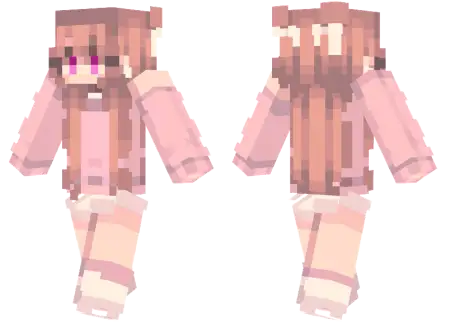
Berry Blossom Skin mine-craft 3-07-2026, 13:29 449 Skins Give your Bedrock character a cozy, everyday vibe with the Berry Blossom Skin, featuring a soft peach outfit and long auburn hair. It is the perfect download to ditch the default options and flex a warm, relaxed style in your next multiplayer session.Letâs be real, rocking the standard Steve or Alex gets old fast, and scrolling through endless pages of custom Minecraft skins usually leaves you with designs that are way too loud or just poorly pixelated. This specific fit hits that sweet spot of looking clean and casual. The creator absolutely nailed the shading on the long auburn hair, and the oversized peach sweater gives off major cottagecore survival vibes. Whether you are building an aesthetic woodland base or just queuing up for minigames in a busy server lobby, this outfit just looks great.Finding cute girl skins for Minecraft that actually translate well in-game without looking like a glitchy mess can be surprisingly tough. But this one is incredibly smooth and fits right into any modern roleplay server or vanilla realm. The warm color palette also pops perfectly against standard block textures, especially if you happen to be running a nice custom shader pack.If you are totally over your current look and want a fresh aesthetic, this MCPE skin download is an easy upgrade. Just grab the file, load it into your Minecraft Bedrock skins menu, and drop into your next world looking flawless.Dropping into an active survival realm wearing this cozy peach setup immediately sets your vibe. Other players instantly recognize you as the server's dedicated builder, the local merchant, or the one player who actually has the patience to organize the communal storage system. Plus, the bright, warm color palette pops incredibly well against darker biomes like the Deep Dark or heavy spruce forests, giving you a distinct, recognizable silhouette without relying on obnoxious glowing textures. When you pair this Minecraft Bedrock skin with a custom shader that enhances floral biomes, the visual synergy is absolutely unmatched.Because it sticks to the classic slim model geometry, you do not have to worry about annoying hit-box confusion or visual clutter. There are no massive 3D extrusions blocking your peripheral vision while you are lining up a critical bow shot or meticulously placing delicate glass panes on your roof. It renders flawlessly across the native engine. Whether you are swiping on a mobile touchscreen, kicking back with a console controller, or sweating on a PC, the pixel art remains incredibly crisp. You totally bypass the rendering glitches that plague heavier third-party MCPE custom skins, keeping your client stable and your frames high during massive server events.If you are entirely burned out on the endless PvP grind and just want to channel some serious cottagecore energy into your next session, making this wardrobe swap is an easy choice. Secure the fit, load into your favorite lush cave or cherry grove seed, and start building that peaceful empire.How to Install Skins in Minecraft Bedrock- Download a .png skin (64Ã64 or 128Ã128).- Open Minecraft Bedrock.- Go to Profile (hanger icon) â Edit Character.- Tap Owned â Import â Choose New Skin.- Select your .png file.- Pick a model: Classic (Steve) or Slim (Alex).- Confirm to equip and play.berry-blossom-skin_png.zip [1.75 Kb] (downloads: 45)
💬 Comments (0)
Login to leave a comment.
No comments yet. Be the first!