

Ash Grey Skin v1.0.0
Overview
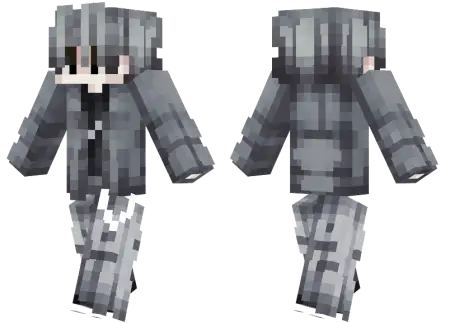
Ash Grey Skin mine-craft 3-07-2026, 13:32 402 Skins Give your avatar a sleek, minimalist upgrade with the Ash Grey Skin, an all-monochrome look that completely redefines modern streetwear in the game. It is the perfect custom outfit for players who want a clean, stealthy aesthetic without relying on flashy neon colors.There is nothing worse than scrolling through thousands of custom Bedrock skins only to find the exact same loud, over-textured designs. Sometimes you just want to keep things low-key. This specific fit completely nails that chill, understated vibe. The creator designed this boy model with incredibly smooth shading, giving him slick ash-grey hair paired with a perfectly matching casual outfit. It looks highly detailed but doesnât scream for attention, making it an absolute must-have if you prefer a subtle, focused appearance while youâre grinding out a survival realm.Running into a sweaty lobby looking like a walking glowstick is basically begging to get targeted first. The Ash Grey skin strips away all that loud, obnoxiously bright geometry and delivers a dead-silent, monochromatic flex for players who let their mechanics do the talking.There is a weird psychology to multiplayer cosmetics right now where everyone wants to be the most visually chaotic entity on the server. We have got demons, oversized anime hair, and neon dragons literally cluttering up the kill feed every single match. Equipping a purely ash-grey outfit completely short-circuits that obnoxious trend. It is an ultra-clean, desaturated aesthetic that borders on legitimate tactical camouflage. When you are lurking in a sprawling deepslate cave system or holding a tight angle inside a shadowy Nether fortress, this muted color palette actually puts in serious work. You naturally fade into the darker background blocks, giving you a crucial split-second advantage against opponents who rely entirely on spotting bright neon colors out of their peripheral vision to snap their crosshairs. It turns a simple wardrobe choice into a heavy gameplay advantage.Because it relies heavily on darker, muted tones, this outfit is actually top-tier for competitive gameplay. You naturally blend into stone bases, caves, and nighttime environments, giving you a slight visual edge in Bedrock PvP servers where staying hidden actually matters. Plus, the cohesive grey palette just looks incredible when you are running modern graphics or ray tracing. If you are tired of rocking the default characters and want to swap out your current look for something much sharper, grab this MCPE skin download. Save the file, import it straight into your character creator, and load into your next match with a genuinely clean style.How to Install Skins in Minecraft Bedrock- Download a .png skin (64Ã64 or 128Ã128).- Open Minecraft Bedrock.- Go to Profile (hanger icon) â Edit Character.- Tap Owned â Import â Choose New Skin.- Select your .png file.- Pick a model: Classic (Steve) or Slim (Alex).- Confirm to equip and play.ash-grey-skin_png.zip [2.96 Kb] (downloads: 21)
💬 Comments (0)
Login to leave a comment.
No comments yet. Be the first!