

Ace of Spades Skin v1.0.0
Overview
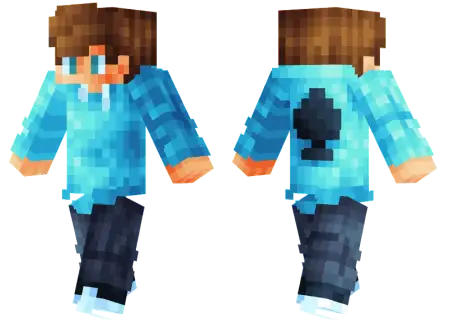
Ace of Spades Skin mine-craft 3-07-2026, 13:20 334 Skins Level up your wardrobe with the Ace of Spades skin, a sleek look featuring a stylish blue hoodie with a custom card logo. Itâs the perfect aesthetic upgrade for players looking to stand out on their favorite Bedrock servers.Let's face it, scrolling through endless pages of cool Minecraft skins can be exhausting. Half the custom skin options out there are either way too over-designed or look like a glitchy neon mess. This fit keeps things incredibly clean and laid-back. Your character gets a fresh modern haircut and a sharp blue hoodie slapped with that iconic card emblem right on the front.Itâs the ultimate aesthetic if you spend most of your time grinding Bedrock PvP or hanging out in multiplayer hubs like The Hive. There's just something about a simple streetwear style that makes you look like a competitive pro without trying too hard. Plus, the vibrant blue accents really pop against standard vanilla landscapes, making it awesome for recording clips or taking quick screenshots.If youâre tired of the default Steve look or your current outdated outfit, this MCPE skin download is an easy fix. Grab the file, import it into your character creator, and hit the lobbies with a fresh fit.Equipping an Ace of Spades cosmetic isn't just about looking sharp while you organize your storage chests; it carries serious psychological weight in multiplayer scenarios. While the rest of the server queues up wearing chaotic neon outfits or overly bulky creature costumes, stepping onto the map with a minimalist, card-themed outfit makes you look like a calculating tactician. The geometry on these designs strictly adheres to the standard player model. This means your crosshair visibility stays absolutely flawless during frantic melee exchanges or intense archery duels. You avoid dealing with massive 3D extrusions or bizarre texture overlaps that ruin your peripheral vision when you are trying to execute a critical ender pearl clutch across the void.Importing this high-roller look into your UI is incredibly straightforward across the modern Bedrock ecosystem. Because these files utilize standard resolution mapping, the dark fabrics and high-contrast icons render perfectly on mobile displays, PC monitors, and console setups without triggering annoying client-side lag spikes. You simply load the file into your dressing room, sync it up with your favorite rare cape to elevate the aesthetic, and queue into your next session. Whether you are managing a massive economy SMP or grinding your way up the local Skywars leaderboards, throwing on this outfit proves you know exactly when to fold and when to go all-in on a team fight.How to Install Skins in Minecraft Bedrock- Download a .png skin (64Ã64 or 128Ã128).- Open Minecraft Bedrock.- Go to Profile (hanger icon) â Edit Character.- Tap Owned â Import â Choose New Skin.- Select your .png file.- Pick a model: Classic (Steve) or Slim (Alex).- Confirm to equip and play.ace-of-spades-skin_png.zip [2.13 Kb] (downloads: 14)
💬 Comments (0)
Login to leave a comment.
No comments yet. Be the first!